
Using saveAS on a PDF form opened in Outlook
Hi Guys and Gals (assuming there are some Nerdy Gals out there  )
)
I have this lovely expense claim form I created and want to have it approved electronically, meaning I will fill out the form and click a "Submit" button to email it to my boss for approval. This all works fine.
When my boss gets the email in Outlook, he double-clicks the attached expense form to review. Hopefully he will click "Approve" at the bottom
The "Approve" button tries to save the Form using this.saveAs in a privileged context.to a trusted location on the bosses hard disk.
That's where it all goes wrong....
Anyway here's my code:
In C:\Program Files (x86)\Adobe\Reader 11.0\Reader\Javascripts I have a script called MyTrusted.js:
var MySavesAs=app.trustedFunction(
function(oDoc,cPath,cFlName)
{
cPath=cPath.replace(/([^/])$/,"$1/");
try{
oDoc.saveAs(cPath+cFlName);
}catch(e){
app.alert("Error during save");
}
}
)
I'm sure Thom Parker will recognise this, cos he wrote it!
In the mouseUp JavaScript for my button, I have
if (typeof(MySaveAs)=="function")
{
var MyPath="C:/AIF/";
var MyFileName=this.documentFileName;
MySaveAs(this,MyPath,MyFileName);
}
Anyway. When the boss opens the attached pdf in Outlook, it is cached in C:\outlookcache\
When he hits the Approve button with the aforementioned button script, he gets "Error during save" from the trusted function MySaveAs.
I have tried to add the directory C:\outlookcache\ to the list of Privileged Locations under the Enhanced Security Preferences, Reader doesn't accept this.
If the Boss manually Clicks File>Save As and saves to C:\AIF\ (which IS on the list of Privileged Locations), and then opens that file from that location he can approve without problems i.e. the script works perfectly.
So, how do I get around this security restriction?
"Enable Protected Mode at Startup" has been switched off, as has "Enable Enhanced Security" but to no avail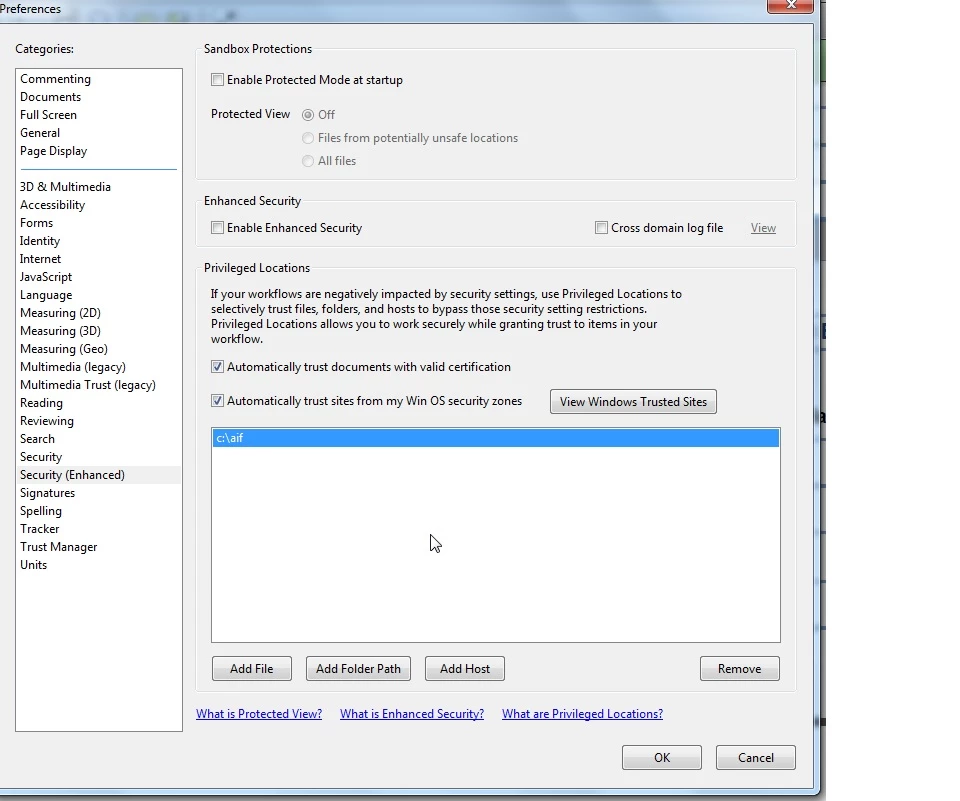
Please tell me I am doing something wrong!!
Louis


 AdChoices