
Validating Fields in JavaScript
I was going to try and send my PDF file to look at and see what I am doing wrong, but it won't let me.
I have 1 4-page PDF form with several fields and there are 18 required fields on this 4-page form that must be filled out. Step 1 is just a text label that said, "Fill out form". On the last page at the bottom are 3 buttons. The "Step 2" button is visible and said, "Step 2 - Review your answers, then click here to submit form". This button has the following Actions:
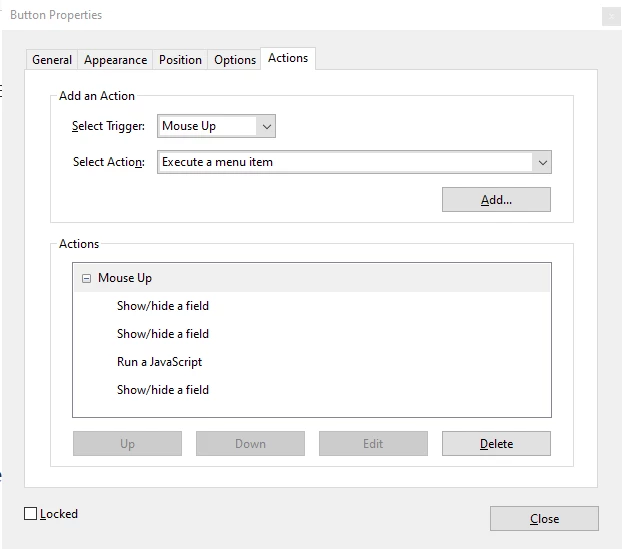
The first 2 Show/Hide a fields hides the Step 3 and Step 4 button. Then run the following javascript code
if (oField.valueAsString == oField.defaultValue) {
   oField.strokeColor = color.red;
   emptyFields.push(oField.name);

    bProcess = false;
}
else oField.strokeColor = color.transparent;
After the javascript code is ran, another Show/Hide for the "Step 3" button.
The "Step 2 button doesn't seem to execute the javascript code.
I was trying to follow this article. Either I missed something or of course not doing it right.
Any help or suggestions would be most appreciated.
Thank you,
Randy Duly


 AdChoices