
Inspiring
January 15, 2016
Question

variable in for loop changes by itself

  • January 15, 2016
  • 2 replies
  • 952 views

I'm trying to replicate the behavior in excel where you can add a blank line to a spreadsheet.  I have a form looking like a spreadsheet where I named my fields according to their line number.  I have a single field where the user inputs the line number where he wants a line to be added and a button to trigger the action.  I created a script that is composed of 2 For Loops inside one another.  The first loop goes through the lines while the second one goes through each individual field of a line.  The goal is to take each value starting from the second to last line and move it to the same field, on the next line.  Value of variable line is 3.  Here is what I came up with:
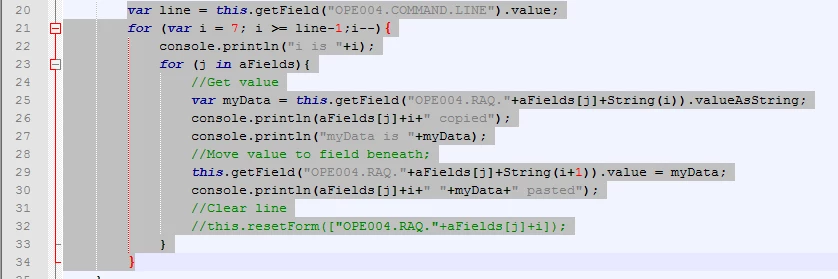
I inserted a bunch of println to see what was wrong with my code.  Notice that only the first 3 lines are filled so I pasted only the console refering to those lines.  For some reason, as soon as there is a value inside a cell, the variable i switches to 0.  Here is the result:

myData is

NATURE.3  pasted

CI.3 copied

myData is

CI.3  pasted

i is 2

TIME.CALL.2 copied

myData is

TIME.CALL.2  pasted

TIME.1018.2 copied                                      //This is the stange part.  As soon as I hit a value, i switches to 0 when it should stop at 2 since the value of line is 3

myData is 0900                                            //myData shows the correct value

TIME.1018.0 0900 pasted                             //TIME.1018.0 should be TIME.1018.2 althought the correct value is pasted to the correct field (strangely)

TIME.END.0 copied                                     //i switched to 0, skipping 1 in the loop althought it should not even be less than 2

myData is 0730

TypeError: this.getField("OPE004.RAQ." + aFields + String(i + 1)) is null 

29:Field:Mouse Up

This topic has been closed for replies.

2 replies

Karl Heinz  Kremer
Community Expert
Community Expert
January 15, 2016

To find out what the error message is actually complaining about, break that one line up into three:


var fieldName = "OPE004.RAQ." + aFields + String(i + 1);

var f = this.getField(fieldName);

if (f != null) {

    f.value = myData;

}

else {

    console.println("ERROR: No field with name " + fieldName);

}


This way, you will get an error message with the field name the script is trying to access. Chances are that something in that name is wrong.

Inspiring
January 16, 2016

my problem doesn't reside in an unexisting field.  I understand what you mean.  I tried what you said and it shows the field its trying to reach is named OPE004.RAQ.whatever.01 which should be impossible since the identation goes from 7 to 1.  Why does a leading 0 appears inside the loop.

I tried going another way about it by puting each values in an array from left to right, then top to bottom, just as you read it, I then reset the original field and reapply all the data starting with the second line.  But I get stuck with the same bug.  Althought the loop goes from line 1 to 7 (i starts at 1 and ++ until 7), as soon as I reach a non null value from my array and copy it to the right field, i becomes 0 and the rest of the data gets scattered everywhere.  HOW CAN i BE 0??????  It goes from 1 to 7?

Here are the alerts I get:

perfect

its an empty field so no value is shown

i is still 2, that's ok

the value in the second field from the same line is 0730, that still correct

Wait, what?  How can i be 0, We are not even done with the first run through the inside loop?  What is wrong?  And then everything goes wrong and i keeps switching between a value of 0 and a value of 1 in a loop that never stops.  I need to ctrl+alt+del myself out of it.

try67
Community Expert
Community Expert
January 16, 2016

Since the i variable is not defined inside the definition of the for-loop I would recommend that you use a variable name that isn't already used somewhere else in the script, as there might be scope issues.

Inspiring
January 15, 2016

This should be the order for the fields

var aFields = ["TIME.CALL.", "TIME.1018.", "TIME.END.", "TYPE.", "LIEU.", "NATURE.", "CI."];

Also, it should be noticed that if I remove the "pasting" part of my code, it scans correctly throught the values from line 7 to line 3 just as requested.