
Participant
February 11, 2016
Question

Warning/Errors: Adobe XML forms cannot be merged

  • February 11, 2016
  • 5 replies
  • 30296 views

Someone from Fiverr is merging PDF documents from me and they are unable to merge some newer PDFs that I downloaded from a government website. They get an error that reads "Adobe XML forms cannot be merged". Is there a way to convert these forms to a mergable pdf format? Here is the error message that he gets.
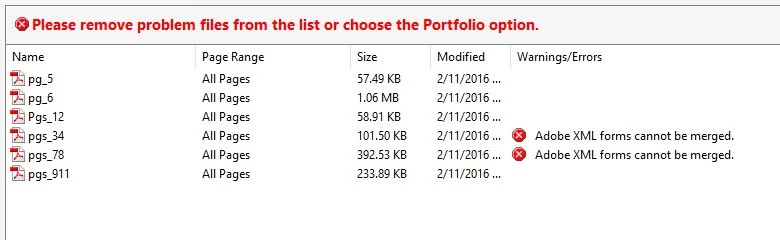
Please advise.

Thank you!

This topic has been closed for replies.

5 replies

Known Participant
April 28, 2016

I have downloaded an Adobe XML file (IRS form) from a government website & without using specific materials, they cannot be merged with other PDF files. Is the below statement directly related to this topic?

Are you sure this is not a file created by exporting form field data to an XML file?

Known Participant
April 28, 2016

First, use these instructions... Then Merging can begin

ADOBE XML FILE (EXTENSIBLE MARKUP LANGUAGE FILE)

(Internet file- webpage)

It cannot be merged to other PDF files.

ADOBE XML CONVERSION TO STANDARD PDF FORMAT

01) Open XML file with Adobe Acrobat.

02) Left Click on ‘Printer’ icon at top.

03) Set Printer Setting to Adobe PDF.

04) Click on ‘Print’ icon.

05)*Point left cursor to extreme right file icon on Taskbar.

06)'Save As' Window; re-name file to desired Folder location.

07) Click on ‘Save’ icon. Font quality/color loss noted.

     *if necessary

Bernd Alheit
Community Expert
Community Expert
February 11, 2016

You can create a portfolio.

try67
Community Expert
Community Expert
February 11, 2016

LiveCycle Designer forms (AKA XML forms) can't be merged like normal PDF files. They can only be edited using LCD.

Participant
February 11, 2016

They are using Adobe Acrobat