
Question
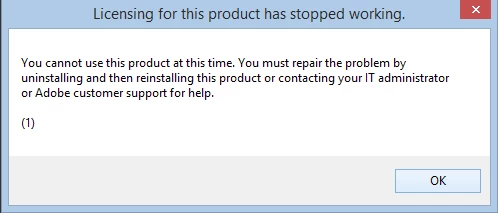
Weird Dialog does not let me use Adobe Acrobat
Hello:
I was using Adobe Acrobat 9.0 that shipped with Adobe Creative Suite 4. All of a sudden, the application stopped working (strangely, the office applications went through set-up routine to be functional again. Don't know what happened.
Nevertheless, I reinstalled Acrobat from the original CD that I had. The installation went without any hitch. But when I launch Acrobat, it comes back with a dialog box and it shuts down.
Following the advice, I thought of uninstalling Acrobat. But my control anel does not list Acrobat as an installed software.
What do I do?
Venki


 AdChoices