


Participant
October 24, 2016
Answered

What happened to the feature of creating multiple PDF files (batch processing)?

  • October 24, 2016
  • 5 replies
  • 962 views

About a month back, Acrobat DC 2015 (Classic), had an option to create multiple individual PDF files under Tools>Create PDF>Multiple Files menu. Now all I see is Combine Files and Create PDF Portfolio. The difference between then and now, aside from the missing option, is the upgrade from Office 2003 to Office 2016, and a re-installation of Acrobat. I've been able to recreate the feature, but it is a work around and not what I expect. Phone support is not available for me, or I'd have called.

This topic has been closed for replies.
Correct answer TanviRastogi

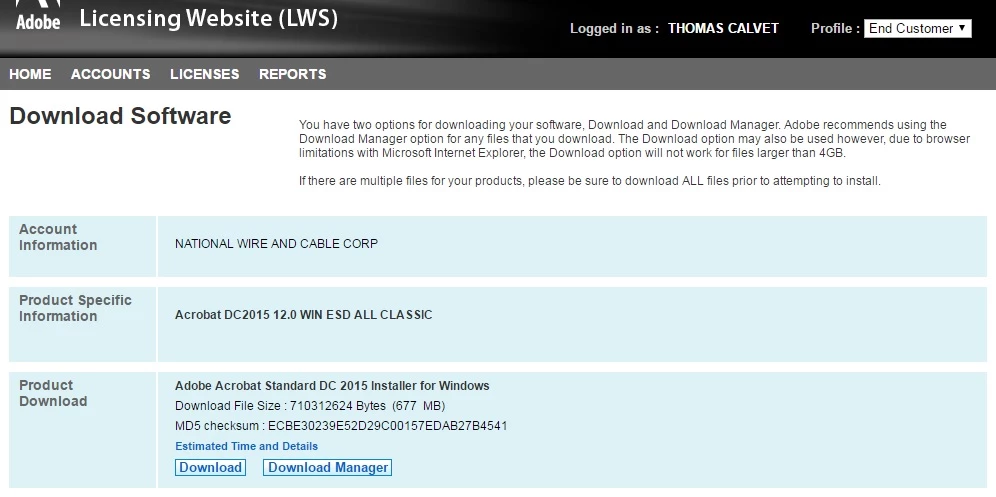
Standard, see screenshot


Thanks Thomas.

Like I said in my previous post, Batch Create option is a Pro only feature. This is not available in Acrobat Standard.

You will need to upgrade to Acrobat Pro to be able to use it.

Thanks

Tanvi

5 replies

Participating Frequently
October 25, 2016

Hi thomasc31007761

We just checked the option you mentioned and we are able to find the same at our end in the application.

I request you to confirm the application name you are using.

Also please confirm if you are looking for the option to create multiple PDF or combine the files.

Thanks,

Supriya

Participant
October 25, 2016

Supriya,

Acrobat DC 2015 (Classic), Adobe Product Version is Acrobat 12.0, and we want to create individual PDFs from multiple MS Word documents, not combining them into a single PDF, or placing them into a portfolio.

TanviRastogi
Adobe Employee
Adobe Employee
October 26, 2016

Hi Thomas

Are you using Acrobat Pro or Acrobat Standard?

The Batch creation option is available only in Acrobat Pro.

Thanks

Tanvi

P.S. Please confirm you Acrobat Product version number as there was no Acrobat 12.0 ever released. The latest is 15.0.xxxxx.