
Known Participant
March 5, 2016
Answered

Why do I get constant, unwanted "Update available for Acrobat DC" messages on boot-up?

  • March 5, 2016
  • 3 replies
  • 1944 views

I have the full version of Acrobat Pro installed and licensed on my computer, but I don't want anything to do with the "Acrobat Document Cloud"!

But every time I boot up, I get a message saying "Update available for Acrobat DC".
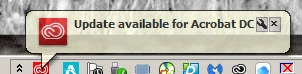
Does this have anything to do with the fact that I have Adobe Creative Cloud installed?

I was required to have it installed when I subscribed to a minimal-cost monthly subscription to Photoshop CC.

But I never wanted anything to do with any 'cloud' features with respect to Acrobat Pro.

How do I make these messages stop appearing?

This topic has been closed for replies.
Correct answer Razz2

Autochthon‌ I have had this issue for months, and have called / chatted with Adobe. Their attitude is that "Acrobat has different developing program structure than other CS 6 products, That is the reason it is showing as update".

I have explained that it obviously sees my Acrobat X Pro, because it wants to "Update" it, and that it should show as "Try" like other apps. I have Illustrator and InDesign CS6 installed along with my CC Photography Program. These apps show as Previous Versions, with the related CC Versions showing as "Try". Adobe's final message was "Since you only have Acrobat Pro X , please ignore that update on CC Desktop app". That is getting increasing difficult, as I have to update the CC apps I do have installed one at a time, avoiding the Update All option. I have also had to disable Desktop OS Level Notifications for the Adobe CC App.

3 replies

Participating Frequently
October 15, 2020

Yeah, I've been dealing with this too. Adobe is totally nonresponsive and their online support is just plain terrible. An "ignore update" toggle for each individual piece of software would be simple to implent (most other companies do this), or just programming their updater to distinguish between Acrobat Pro X and DC. Like, how hard can it be?


It's obvious that they just hold us in contempt for not chaining ourselves to their subscription model on a single final product that works fine as it is.


By the way DONT update to DC. It does overwrite Acrobat DC, and the CS6 installers that you have to jump through hoops to get from Adobe's terrible online support no longer run on MacOS. Not sure about windows, but I think the only way to re-install Acrobat Pro X right now is via a system restore.


[reply edited by moderator]

Razz2Correct answer
Participant
April 11, 2016

Autochthon‌ I have had this issue for months, and have called / chatted with Adobe. Their attitude is that "Acrobat has different developing program structure than other CS 6 products, That is the reason it is showing as update".

I have explained that it obviously sees my Acrobat X Pro, because it wants to "Update" it, and that it should show as "Try" like other apps. I have Illustrator and InDesign CS6 installed along with my CC Photography Program. These apps show as Previous Versions, with the related CC Versions showing as "Try". Adobe's final message was "Since you only have Acrobat Pro X , please ignore that update on CC Desktop app". That is getting increasing difficult, as I have to update the CC apps I do have installed one at a time, avoiding the Update All option. I have also had to disable Desktop OS Level Notifications for the Adobe CC App.

Known Participant
April 11, 2016

‌thanks, Razz2; it's unfortunate that Adobe has allowed their software updating service to inappropriately task humans with ignoring their automatic, unwanted update alerts, due to sloppy programming!

Kanikas
Community Manager
Community Manager
March 9, 2016
Known Participant
March 14, 2016

59 views and nobody has a clue....not a good scenario!