Known Participant
July 16, 2021
Answered

Adding gradiens from Adobe Color (ex Kuler)

  • July 16, 2021
  • 2 replies
  • 809 views

I am having a rough time figuring out how to add gradients that I created in color.adobe.com to my gradients in Photoshop. I have searched everywhere but can't find a solution . Also, having to copy every value in a colour from the swatches created to get them into my swataches panel just seems like so much extra work compared to how Kuler worked. For now though... any help on how to get those gradients into Photoshop not just into My Library (got that far) where I can actually use them? Thank you. 

    This topic has been closed for replies.
    Correct answer rob day

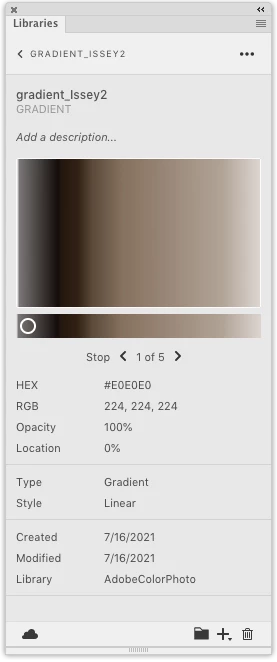
    In case it wasn’t clear, you have to also double-click the saved gradient to get to the ... icon I’m showing:


    2 replies

    rob day
    Community Expert
    rob dayCommunity ExpertCorrect answer
    Community Expert
    July 16, 2021

    In case it wasn’t clear, you have to also double-click the saved gradient to get to the ... icon I’m showing:


    Known Participant
    July 16, 2021

    BRILLIANT!! Thank you, and why sometimes we need to seek help instead of mumbling under our breath. 

    Thank you, thank you, and thank you. 

    rob day
    Community Expert
    Community Expert
    July 16, 2021

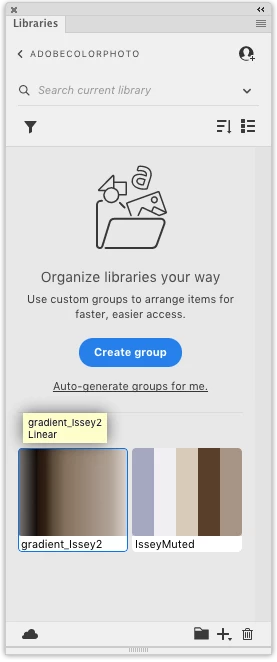
    Creat your Gradient and save it to an existing library, or create one via the + icon—here I’m saving gradient_issey2 to my AdobeColorPhoto library


    In Photoshop open you Libraries Panel, and you should see your saved AdobeColor libraries listed. Double-click the Library with the saved gradient, and then from the ... icon chose Create gradient preset, and the gradient will be added to the bottom of your Gradients panel: