


Inspiring
March 26, 2022
Answered

CMYK color wheel does not look like CMYK color wheel

  • March 26, 2022
  • 3 replies
  • 10687 views

Hi! I wanted to use a color wheel at Adobe Color site. I needed a color palette in CMYK. I set CMYK in Adobe Color in the lower left corner on the site. But the color wheel on the site looks nowhere near like CMYK. Colors are vibrant like in RGB, not faded as in CMYK. How to see this color wheel in CMYK colors? I don't want to see those CMYK colors only after importing to PS or AI. I want to see it at Adobe Color site to match my colors better, because this site is very useful. Do you have any idea how to do this?


In the first attachment it is a screenshot of the color wheel in Adobe Color described as CMYK with too vibrant colors to be the real CMYK. In the second attachment, in comparison, it is a a screenshot from the CMYK color wheel in Adobe Illustrator, with faded shades as I would like to see in Adobe Color, but sadly I don't...

This topic has been closed for replies.
Correct answer rob day

Hi @Fraglessina , in case you are still following this thread, the reason for Adobe Color’s limited color management is that it is a web based app and browser color management is very limited.


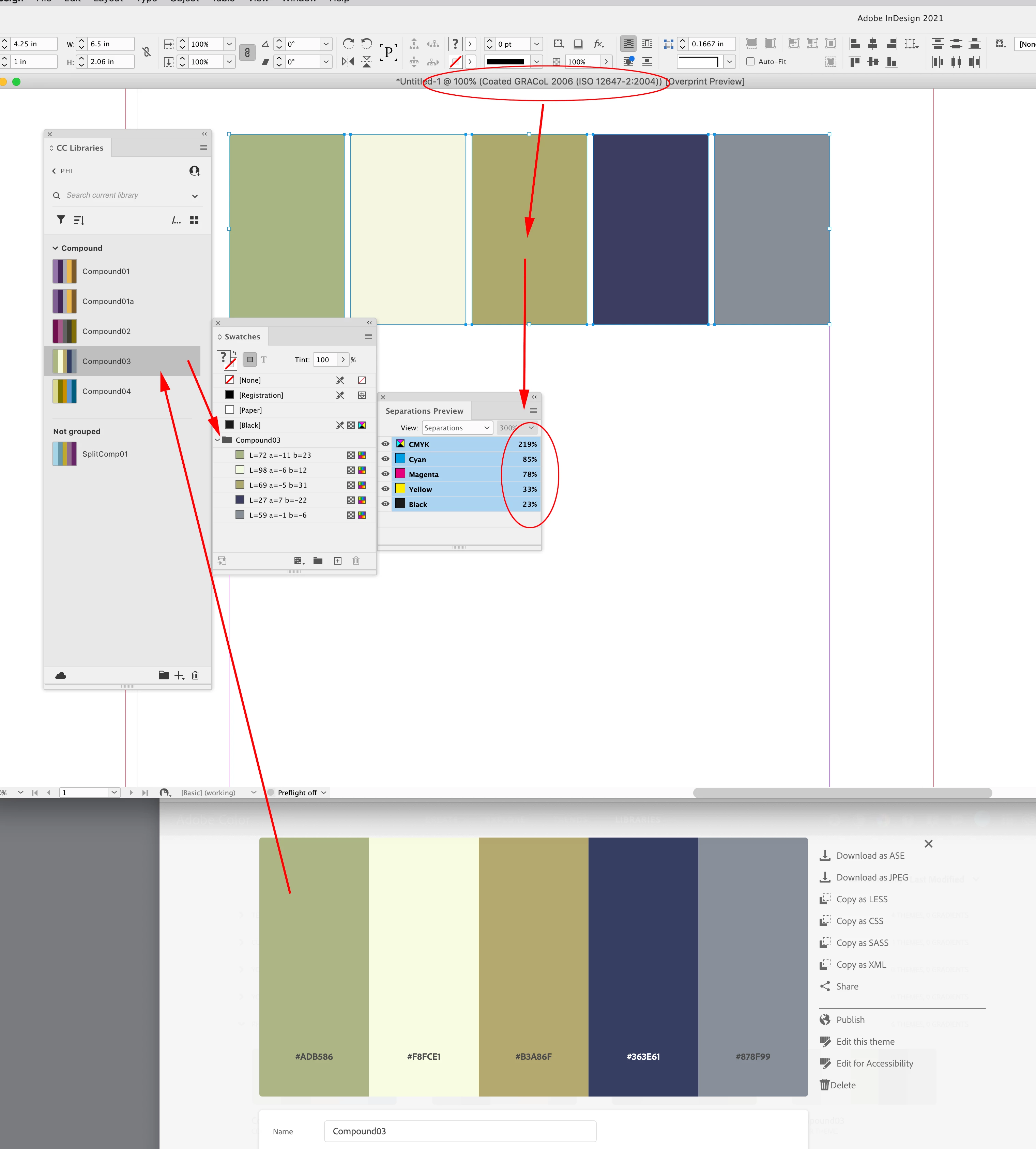
If you want to accurately color manage your themes, set their color mode to Lab and let the Adobe app make the conversion to your CMYK output profile. For example here I’ve made a theme named Compound 3 in Lab mode, and in InDesign I’ve added the theme to my Swatches panel.


My document’s CMYK profile assignment is Coated GRACol 2006 and InDesign’s Separation Preview shows the color managed GRACol output numbers while maintaining the theme’s original color appearance.


Browsers and HTML  have no Overprint or Color Proofing capabilities, so your only choice for out-of-gamut color is to bring the theme into an Adobe app and turn on Overprint Preview to see the CMYK gamut clipping.

3 replies

rob day
Community Expert
rob dayCommunity ExpertCorrect answer
Community Expert
March 30, 2022

Hi @Fraglessina , in case you are still following this thread, the reason for Adobe Color’s limited color management is that it is a web based app and browser color management is very limited.


If you want to accurately color manage your themes, set their color mode to Lab and let the Adobe app make the conversion to your CMYK output profile. For example here I’ve made a theme named Compound 3 in Lab mode, and in InDesign I’ve added the theme to my Swatches panel.


My document’s CMYK profile assignment is Coated GRACol 2006 and InDesign’s Separation Preview shows the color managed GRACol output numbers while maintaining the theme’s original color appearance.


Browsers and HTML  have no Overprint or Color Proofing capabilities, so your only choice for out-of-gamut color is to bring the theme into an Adobe app and turn on Overprint Preview to see the CMYK gamut clipping.

Inspiring
March 30, 2022

Thank you very much!


Bob_Hallam
Legend
March 26, 2022

The CMYK values are not going to be viable in this application.  They are not based on any standard print proceess, and should not be used.   Instead set up the color you want as a spot color in InDesign or Illustrator, then convert them to CMYK using the correct profile on export to PDF.  

ICC programmer and developer, Photographer, artist and color management expert, Print standards and process expert.
Legend
March 26, 2022

It's sad. Adobe were leaders and pioneers in the development of accurate colors, and tools for checking and creating them. This looks instead like a student project that somehow ended up under their corporate name, without any quality checking or validation. Just "hey, we've got a color wheel". Does anyone know (and can tell) the actual history of how this shameful state came about?

Legend
March 26, 2022

I think it's clear that the coders who make Adobe Color had no clue about CMYK. Any CMYK tool which doesn't allow or report what ICC profile in use is a bad joke. There are many very bad CMYK selectors on the web, because most programmers have no actual clue about color science, but it's very disappointing to see Adobe among them. No Adobe person has ever acknowleged that Adobe Color has any kind of problem so far as I know. But I notice the integration with Adobe apps has been removed; maybe the other programmers were embarrassed at the association.

Inspiring
March 26, 2022

I still hope that I can set it somewhere... I choose beautiful colors in Adobe Color and "surprise" - this so called CMYK is converted to the real CMYK in Illustrator and it turns out that colors that I picked does not match with each other, but they have looked like matching in Adobe Color 😞 For example light green from Adobe Color set on CMYK, is in CMYK file in Illustrator a really dark green, and vibrant orange is a chocolate brown... it's not a small difference in colors, this is a huge difference and I don't know why I can't set in Adobe Color to see only CMYK colors because we all know the huge differnce between CMYK and RGB... Why I can choose CMYK in Illustrator and it works great, but in Adobe Color not...