Community Manager
May 30, 2013
Answered

How do I use themes with Adobe Illustrator®, Photoshop®, InDesign®, Fireworks®, and Flash® Professio

  • May 30, 2013
  • 7 replies
  • 36816 views

Creative Cloud users can access all their themes directly within Illustrator CC. To access your themes, open the Color panel by choosing Window > Color Themes.  You can also access your themes and create new ones in the latest version of Adobe Ideas, Adobe Draw, Adobe Line, Adobe Sketch and more.

For users who prefer to explore and browse themes created by members of the Color community first, we recommend using the web site—where you will find robust search, filter, and browsing capabilities. Once you find something you like, simply mark it as favorite and then refresh your Color panel in Illustrator.

For Photoshop®, InDesign®, Fireworks®, and Flash® Professional:

Find the new Color panel by choosing Window > Extension > Color Themes . This new panel displays all of your public themes.

For users working on older versions of Adobe software (CS4, & CS5), Color themes can also be downloaded for use in Adobe software using the Adobe Swatch Exchange (.ase) format. To download a theme from Color, first make sure you’re signed in. Click on the theme you’d like and click Download. This downloads the theme as an .ase file to the location of your choice.

Note: The Kuler panel is no longer supported in CS2 and CS3.
This topic has been closed for replies.
Correct answer Neha Sirohi

1. In InDesign CC, kuler menu is in Window > Extensions menu.

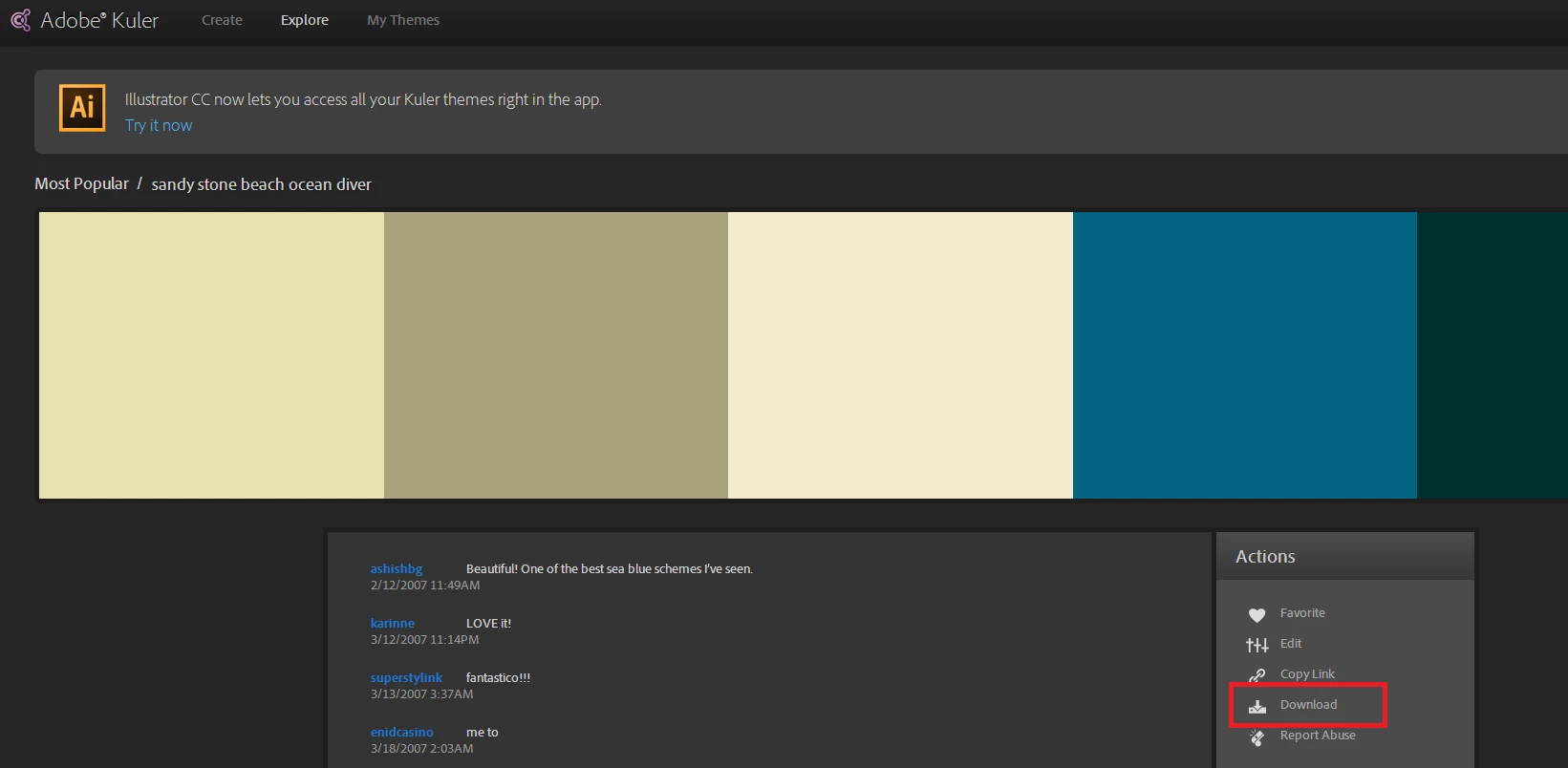
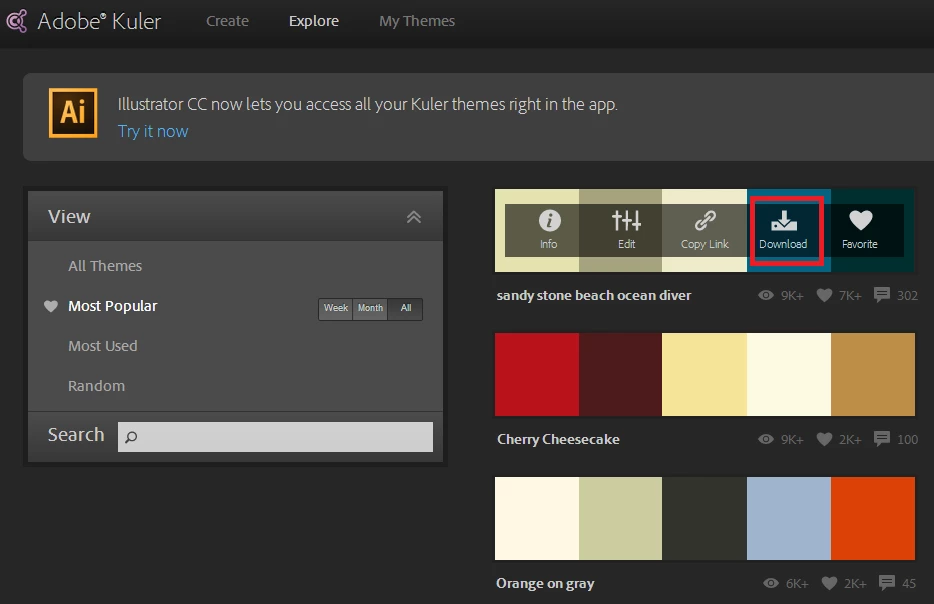
2. On Kuler Website,  Download ase option is present in theme hover menu and on the 1-up page (see screenshot below ). You need to Sign-in to download a theme as .ase file.

3. Download ASE option is not present on devices which don't support .ase file format e.g. iPad. Which browser & OS are you using ?

7 replies

Inspiring
May 1, 2014

In ordre to use Kuler for éditions/managing swatches, is it planed to add/retrieve "Ase" file support in AdobeBridge and, best in AEM Dam ? It could be really valuable for Corporate use.

Participant
March 27, 2014

How can Dreamweaver interact intuitively with Kuler?

Participant
January 30, 2014

Hello,

I can not find the plug in "Kuler" in extensions that are either Photoshop or Illustrator InDesign.

Even through Adobe Exchange.

Participating Frequently
February 24, 2014

I'm having this same problem. Kuler and Mini Bridge used to be in under Window>Extensions but they are no longer there, and looking for them in Adobe Exchange produces no results. Wondering if Adobe could just put them in the Adobe Exchange for users who are having this issue so they can re-install these extensions or have a link in this thread to reintall these extentions.

Dave ECommunity ManagerAuthor
Community Manager
February 24, 2014

What version of the app(s) are you using?

Participant
August 18, 2013

Hi Dave,

This is great news and I really appreciate it.

Could this same feature be implemented in MUSE for our webdesigns?

It would be great.

Thanks,

GG

Participant
August 7, 2013

I can't get this to work at all.

I am in CC programs. There is no Kuler in my InDesign WIndow menu? Also When I go to the Kuler website the only download option downloads as an html link. I cannot get an ase which I need. I have done the Lynda.com tutorials but the Kuler website does not look the same as in the tutorials. I do not have the Download as ASE file button.

I went to the adobe site but could not find anything helpful there.

HELP!

Neha SirohiCorrect answer
Adobe Employee
August 7, 2013

1. In InDesign CC, kuler menu is in Window > Extensions menu.

2. On Kuler Website,  Download ase option is present in theme hover menu and on the 1-up page (see screenshot below ). You need to Sign-in to download a theme as .ase file.

3. Download ASE option is not present on devices which don't support .ase file format e.g. iPad. Which browser & OS are you using ?

Participant
August 7, 2013

Hi Neha,

Thank you for your help.

I found it now and have downloaded. In am on OS Mountain Lion.

For your info I could not even easily find the Kuler website on the adobe site it took me ages to figure it out. It is off to the right hand side as if it is a test version. I found this so unintuitive.

I was looking through my CC link and everywhere. Why doesn't it appear in the CC link with all the other apps?

I am creating a style guide for a client and want to have a simple system for them to have their corporate palette supplied in.

Thanks for your help.

Regards,

Robyn

Robyn Latimer

Eye Visuals Pty Ltd

0414 762 193

www.eyevisuals.com.au

Participant
June 19, 2013

Actually it's Window>Extensions>Kuler (Photoshop CC - I know it's a small point...)

Participating Frequently
September 20, 2014

Thank you so much! I've been looking for that forever, life is easy now

Known Participant
May 30, 2013

None of my public themes are syncing; in fact, nothing is syncing between my online Creative Cloud, my Adobe programs and/or files on my Macbook Pro and my iPhone/iPad apps. None of it are syncing at all. Been like this for months. Can't seem to get any help from Adobe support either. Any advice?

Dave ECommunity ManagerAuthor
Community Manager
May 30, 2013

Jido_genshi- I'll send you a seperate message to troubleshoot.

Participant
March 7, 2023

Same problem. Libraries from Adobe Color do not sync with the creative cloud.