andreafuredy
Participant
June 17, 2025
Answered

Is there no way to rename or delete libraries?

  • June 17, 2025
  • 2 replies
  • 140 views

It seems there is no way to rename a library (the folder that is a collection of themes) or "move" themes between libraries. Am I wrong? I just created a new library and had to save each theme to the new folder and then delete all the ones in the folder name I could not change. I got all but one "moved" through this duplication process and ended up with the library I couldn't rename with one item left that it won't actually delete even if I go through the steps, and no way to delete the wrongly named library in general.

I have a deep desire to keep things organized and the options in color.adobe.com leave me wanting. Let me know if there's something I am missing.

Thanks!

    Correct answer Oh.N8

    Hey @andreafuredy 

    You would have to open your Adobe Creative App.
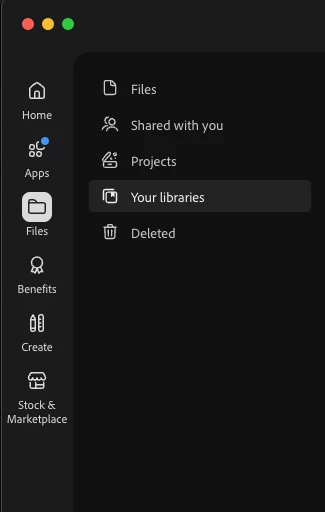
    Open Files => Choose Your Libraries

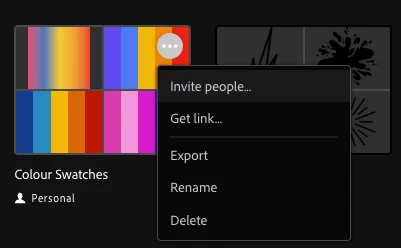
     Select a Folder/ Library. The 3 dots in the top right hand side will give you a drop down menu.


    (Cmnd + Click) on Mac will give you the option to choose specific colour palattes to move or delete. (Individual select)
    (Shift + Click) will select multiple palettes in a row. (group selection)

    Cheers

    Nate

    2 replies

    Oh.N8Community ExpertCorrect answer
    June 26, 2025

    Hey @andreafuredy 

    You would have to open your Adobe Creative App.
    Open Files => Choose Your Libraries

     Select a Folder/ Library. The 3 dots in the top right hand side will give you a drop down menu.


    (Cmnd + Click) on Mac will give you the option to choose specific colour palattes to move or delete. (Individual select)
    (Shift + Click) will select multiple palettes in a row. (group selection)

    Cheers

    Nate

    June 25, 2025

    Hey @andreafuredy 

    Could you please provide a screenshot of what you mean? I think I get what you mean. A screenshot would help though.

    Cheers
    Nate