


Participating Frequently
December 21, 2022
Question

Not able to SAVE

  • December 21, 2022
  • 2 replies
  • 1717 views

Hi there, new to Adobe Color.

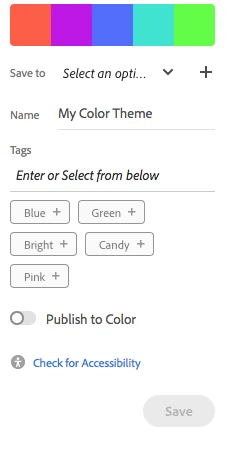
Ive uploaded and image and want to save my colour palet but it is not allowing me to save.

"Save to" is inactive(when i click the arrow pointing down it does nothing). I can creat a new collection and write a Name, but it is about it.

Do i have to pay? Or have other apps such as PS or Illustaror in order this to work?

Thank you.

Jana
    2 replies

    Participant
    December 26, 2022

    问题解决了吗,我也遇到同样的问题了,没有找到解决方案

    Adobe Employee
    January 3, 2023

    please check if your account have access to creative cloud services or not. you can check this with adobe customer service.

    in the meantime, please open https://assets.adobe.com/libraries and see if your account shows access to cloud storage (at bottom left). if you are unable to access above page, it is possible your account doesn't have access to storage service, which is needed to store/save color palette.

    Adobe Employee
    December 21, 2022
    Can you please create a new library (using + button on the page), and try to save color palette in that.
    If that doesn't work, please let us know and we can check on your issue.
    BOBINEKAuthor
    Participating Frequently
    December 21, 2022

    Thank you for your reply this is all I can see on my screen, I dont think I can do what you suggest 🙂

    Bob_Hallam
    Legend
    December 21, 2022

    You need to sign in first

    ICC programmer and developer, Photographer, artist and color management expert, Print standards and process expert.