Participant
February 19, 2025
Answered

Spreading color markers

  • February 19, 2025
  • 2 replies
  • 362 views

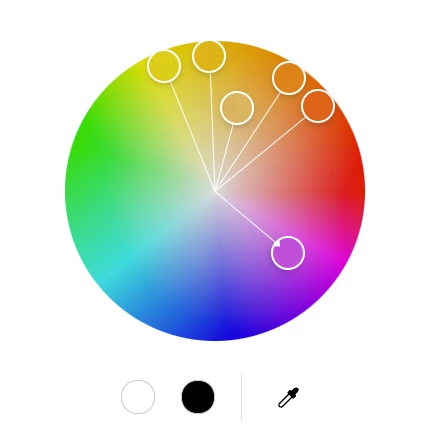
How do I spread the color markers in unison? When I try to spread them in analogous they all move together.

    Correct answer Oh.N8

    Hey @Incredible_portfolio3734 

    If you want to move individual markers seperately
    One method

    1) click on the circle of choice

    2) click on the eye dropper

    3) click on a spot in the colour wheel 


    Second method
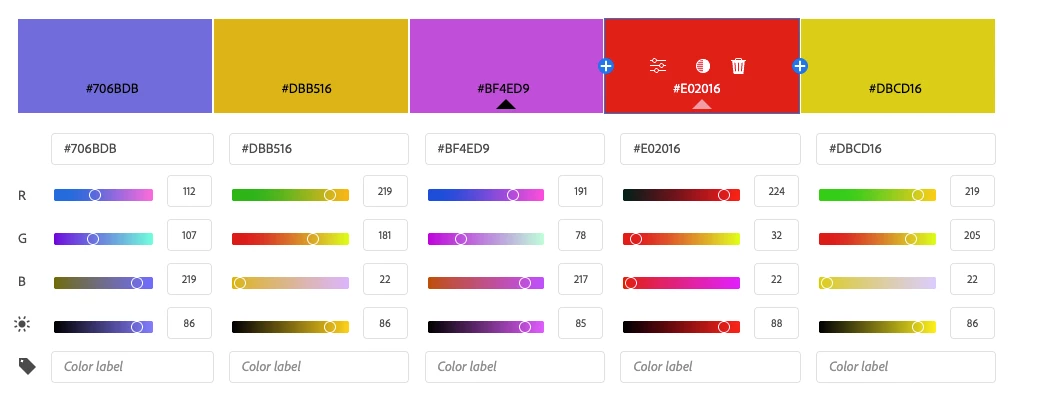
    1) in the colour box there are 3 options


    a) Change colour (Sliders)
    b) Change tint (Circle)
    c) Remove (Trash can)

    cheers

    O. Nate

    2 replies

    Oh.N8Community ExpertCorrect answer
    February 25, 2025

    Hey @Incredible_portfolio3734 

    If you want to move individual markers seperately
    One method

    1) click on the circle of choice

    2) click on the eye dropper

    3) click on a spot in the colour wheel 


    Second method
    1) in the colour box there are 3 options


    a) Change colour (Sliders)
    b) Change tint (Circle)
    c) Remove (Trash can)

    cheers

    O. Nate

    Participant
    February 27, 2025

    Thanks. Just to be clear, I can move them individually but when I want them to SPREAD OUT in Analogous for example by dragging the markers on the out side, they all move in the same direction around the wheel.


    On several YouTube videos it looks like they're supposed to spread out when you drag the outside ones.


    Does the same thing on my phone too.

    Marco Petrolio
    Participant
    April 12, 2025

    I have the same problem with all the color schemes. Let me know if you find a solution. Thanks!

    Participant
    February 19, 2025

    They all move in the same direction, I should say.