Known Participant
July 12, 2021
Answered

THEMES TO SWATCHES

  • July 12, 2021
  • 2 replies
  • 624 views

I am posting this here as it was a reply to an older post and might get overlooked. Please... and solution?

My reply on post of 2017: "This is an old post, but having the same problems and complaints as the others. Yes I can create a theme, sure it goes into libraries, but the first swatch worked fine, however when I went to add the next colour in the row it just kept showing me the first swatch colour? Kuler was definately "cooler". I could use my phone to just aim at something, maybe a bit of fabric in a shop and the theme was created as I chose, and to include just moving my phone a bit to find a different group of colours. I can't seem to find that feature now. Until Adobe comes up with a way to save the contents of the history panel on your images when you close Photoshop, it's not faesible to just reboot all the time. Right now though, I just want to be able to get those themes into swatches without having to go through so many steps or write down values. Change is not always a good thing apparently." 

    This topic has been closed for replies.
    Correct answer rob day

    The coding for the Kuler site was Flash/ActionScript, so the missing camera feature may be an HTML5 Javascript limitation.


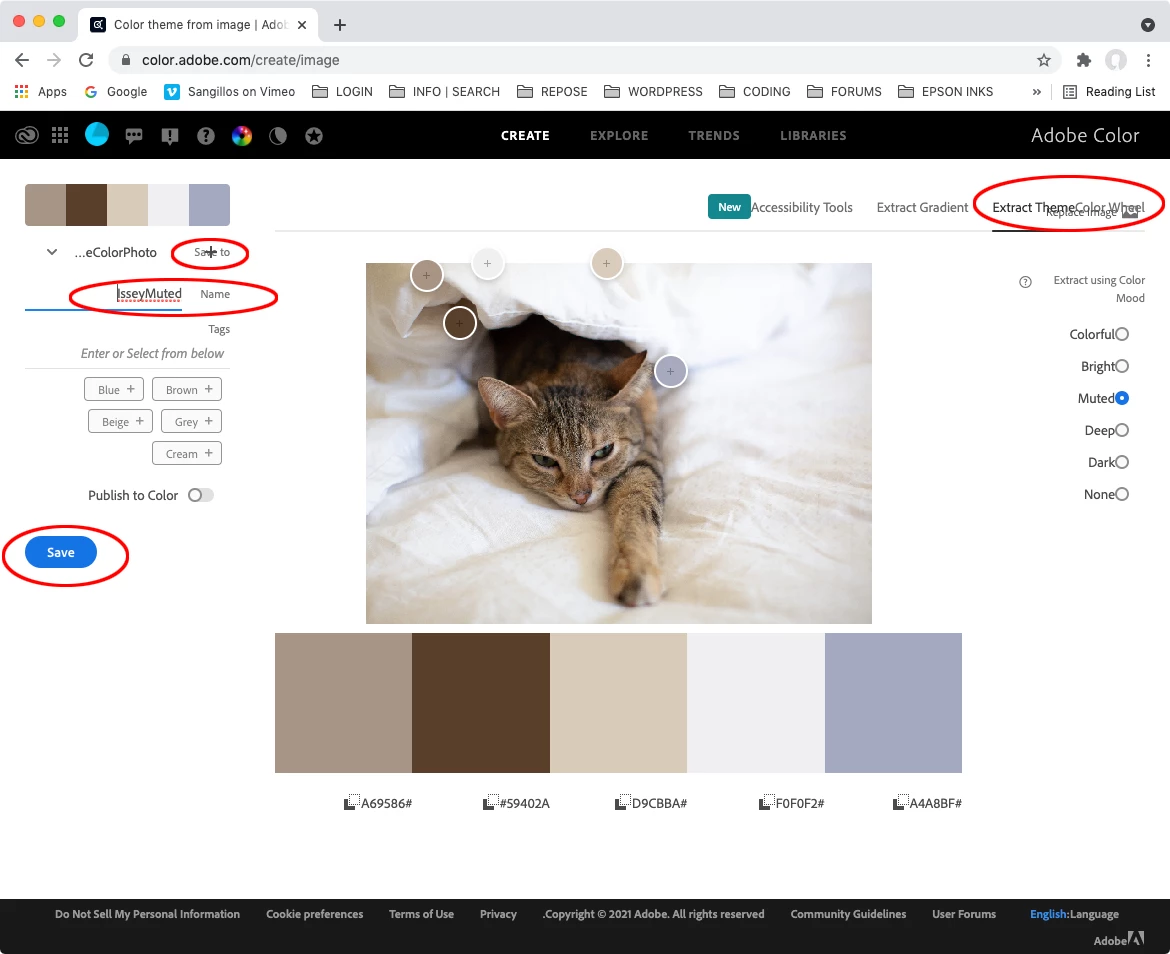
    If you haven’t noticed, there is the new Extract Theme Color Wheel, which lets you upload a photo and extract a theme:


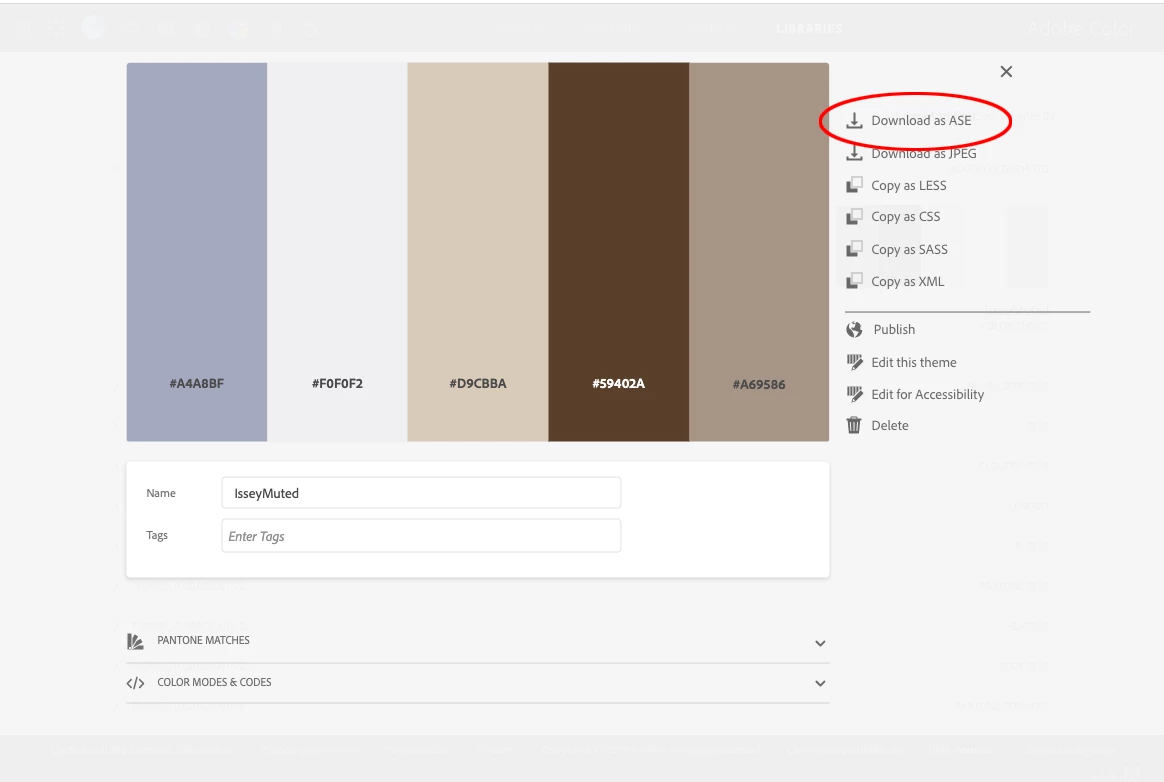
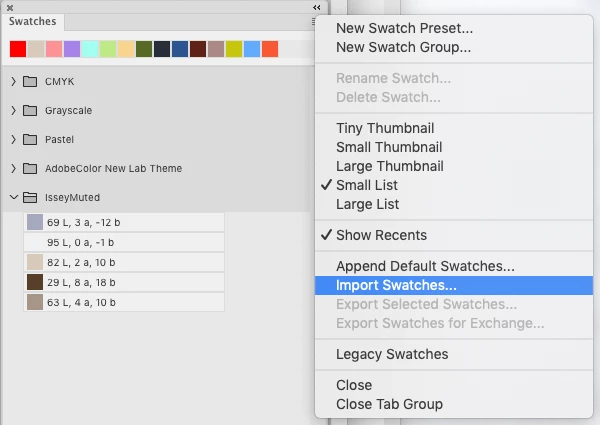
    From the site’s Libraries tab, https://color.adobe.com/mythemes, you can double click, and save out a theme as an .ASE file, which can then be loaded into a CC app‘s Swatches panels:


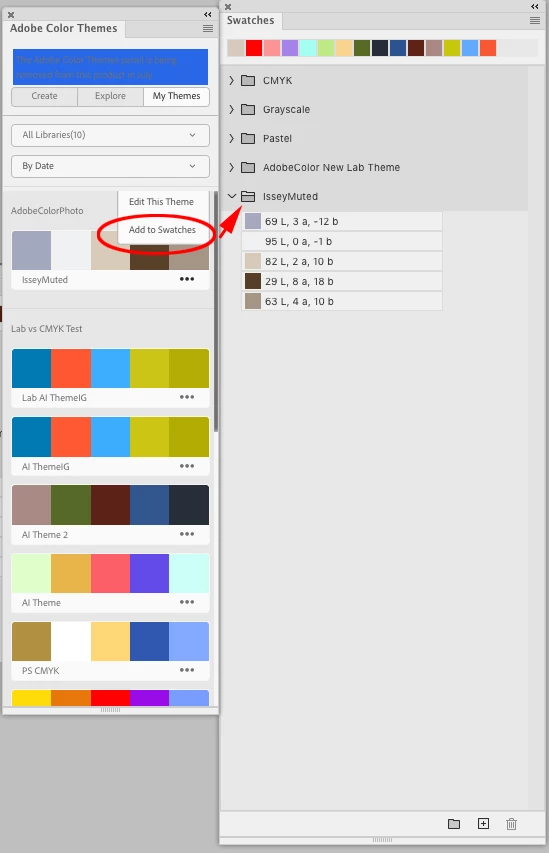
    The Adobe Color Themes panel, which apparently is about to be removed, allows you to add a theme to the swatches panel by clicking the ... icon:


    2 replies

    Known Participant
    July 12, 2021

    Thank you SO MUCH! This had been immensely helpful. I still miss the phone feature because you could change colours on the fly without  having to use a taken image, but maybe they will bring that back somehow? In the meantime I shall practice with this, and also see if I can figure out, or research out, how to do the same with the gradients as the swatches. Thank you again. 

    rob day
    Community Expert
    Community Expert
    July 12, 2021

    Also, if you create a theme from a photo, I think its color mode will always be RGB. If you click Edit this Theme after creating it, there is an option to set the theme’s Color Mode. Set your themes mode to Lab, and you will be able to color mange the colors when you move the swatches into the CC apps.

    rob day
    Community Expert
    rob dayCommunity ExpertCorrect answer
    Community Expert
    July 12, 2021

    The coding for the Kuler site was Flash/ActionScript, so the missing camera feature may be an HTML5 Javascript limitation.


    If you haven’t noticed, there is the new Extract Theme Color Wheel, which lets you upload a photo and extract a theme:


    From the site’s Libraries tab, https://color.adobe.com/mythemes, you can double click, and save out a theme as an .ASE file, which can then be loaded into a CC app‘s Swatches panels:


    The Adobe Color Themes panel, which apparently is about to be removed, allows you to add a theme to the swatches panel by clicking the ... icon: