



Ann Kozma
Community Manager
Community Manager
June 27, 2025
Question

A Brand New Home Experience 🤩

  • June 27, 2025
  • 4 replies
  • 585 views

Have you seen the redesigned Homepage when you launch Adobe Express for Education? 


Built with feedback from teachers and students, creativity is now just a click away! When you open Adobe Express for Education, you'll be greeted with a dynamic new Homepage experience that gives you quick access to Create, Teach and Edit - plus all the learning opportunities that you love from Adobe Express. 

🤩 Cleaner layout! Faster navigation! Inclusive design!
🥰 Easier access to your templates, assignments and projects!


One thing I love to say is, "Push all the buttons and play to learn!" This has become my mantra when creating or exploring features. In Adobe Express for Education, you truly have endless creative possibilities at your figertips - and this new Homepage experience makes it even easier. Whether you want to generate an image with AI, use a Guided Activity with built-in instructions, animate a character, create a webpage, create a video or drive your own professional learning with our self-paced course, it's all right there for you. I encourage you to explore the new Homepage and click on each tab to get a feel for the experience.
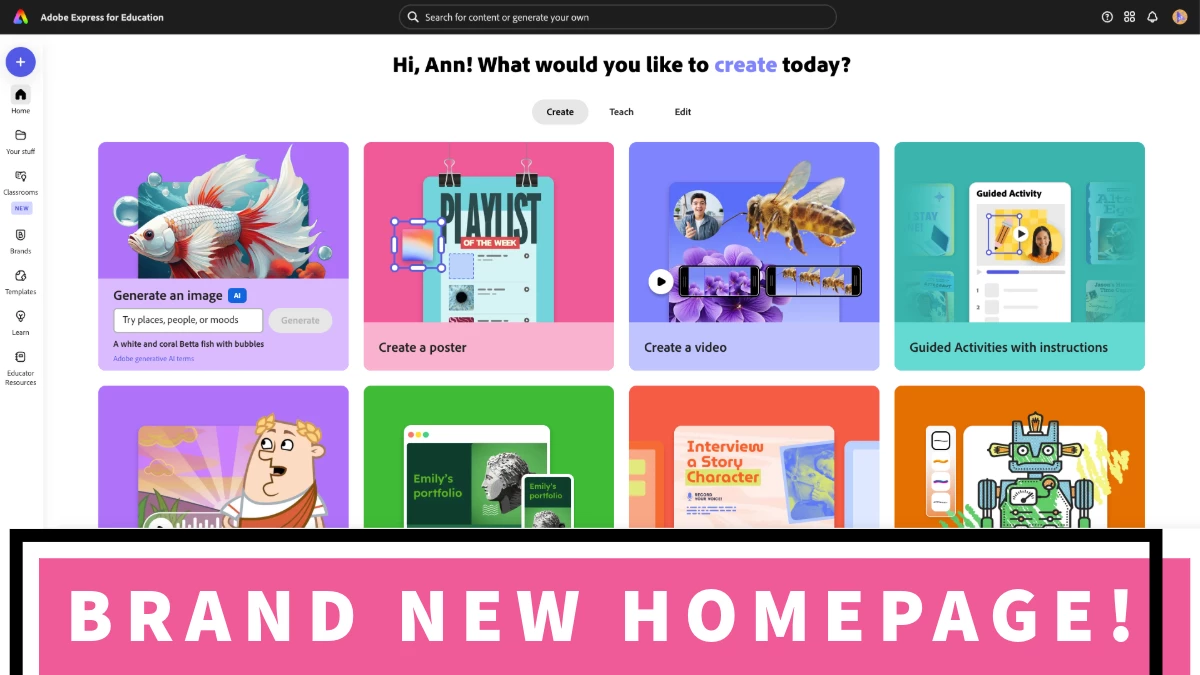


Create - jump into creativity with easy access to templates, media tools and projects across formats

  • Generate an image
  • Find Guided Activites with instructions
  • Make logos, infographics, and even QR Codes
  • Create posters, videos, webpages, drawings, presentations and more


TEACH - get resources that support teaching with Express, not just creating

  • Onboard to Express & earn your Adobe Creative Educator Badge
  • Use curated classroom activities
  • Create assignments
  • Showcase student worith with galleries
  • Browse templates by subject or grade


EDIT - customize existing materials with built-in tools

  • Remove backgrounds and objects
  • Edit PDFs
  • Convert to GIF and SVG
  • Caption videos
  • Insert objects to an image
  • Convert from PDF
  • Combine files


This new Homepage truly simplifies the process - and it was so awesome to see early community reactions!

❤️ "Loved seeing the new look when I logged in today!" ~Jody G
❤️ "Love this update! Everything is so organized into easy to find categories. So clean and simple!"  ~Maria G

What will you create today? Let us know in the comments what you think and what you are excited to create with Adobe Express for Education!

4 replies

Participant
July 21, 2025

My kids and I LOVE the new homepage. The robot icon for drawing was their fav

Participant
July 3, 2025

SoOo I'm LOVING the new layout of Express' landing page (the app, too!)! I accidentally stumbled upon it the other day and was so excited!

It's so nice to be able to choose which pathway I want to focus on. I also really love the sleekness of it -- it's more condensed and simplified without losing any of the functionality (and cuteness 😍) of the previous layout. I think the kids will be super excited to explore it when we get back to school in August! 🎉

Known Participant
July 4, 2025

It's just so easy to navigate, which is helpful for our students. I am obsessed!

Amanda Hunt @thenextgenlibrarian
Crystal Spelic
Participating Frequently
July 1, 2025

The new homepage is everything! My summer favorite right now is under the Edit Tab. For all my fellow circut crafters, the SVG converter is a game changer. #chefskiss Who else is redecorating their classroom this summer?


Participating Frequently
July 1, 2025

Hi Crystal!

Not only do I love the new home page more than peanut butter loves jelly and beans love rice, I am so excited to use the new Gallery inside of Classroom for sharing and discussion of any topic . . .Have you had a chance to use it yet?? Here is a screenshot of me playing around with the different ways students can post to it!!

Crystal Spelic
Participating Frequently
July 2, 2025

Yes! Love your "Preview of Awesomeness." The AI Generator in there too is so cool. 100% these galleries take Adobe Express to another level! I can't wait to use this new feature with students

NicoleO'Connor
Adobe Employee
Adobe Employee
June 30, 2025

I love, love, love it! Especially because Drawing has a feature tile - as it so rightly deserves! ✍️ 🌟  Super clean and organised!

Participating Frequently
July 1, 2025

Hi Nicole! 

What is your favorite way to use Drawing? One thing I love to do is to have students use it to draw a funny creature, then upload the image as a reference for the text-to-image AI in to the "Animate a Creative Creature" Guided Activity. . .Here is a link to the video Introducing Rainbow (hope it works). I will also upload a .png of the project with the reference drawing . . . Anyone else use drawings this way??

Participant
July 3, 2025

Jeff!! Hi friend!!

I thought I'd jump in and add my thoughts because I love this question! I love using drawing with my littles to start with! I've used it with kids as young as kinder and they love the different brushes that it provides! It's also super safe for me to allow kids to explore without me hovering over them! They also really love the symmetry feature and I'm sure their future math teachers will appreciate it! 😆