



Martha Bongiorno
Community Manager
Community Manager
December 1, 2025
Question

🌍 ACE Community Monthly Share – December

  • December 1, 2025
  • 13 replies
  • 2584 views

Hello ACE Community!! ❤️


December is here, which means one thing around our corner of the internet… 12 Days of Creativity is officially live!


This month is all about joy, low-lift creative wins, and giving ourselves (and our students!) moments of delight during the busiest stretch of the year.


This thread is your cozy corner to gather, share what you’ve been creating, and cheer each other on as we wrap up 2025 with a burst of creativity.


How to Join In

  • Share your December wins: Drop a link to any social post, video, or project you’ve tried this month.
  • Add a quick reflection: What brought you joy? What surprised you?
  • Use the Reply button so everything stays in one thread (easier for us all to scroll and celebrate together!).


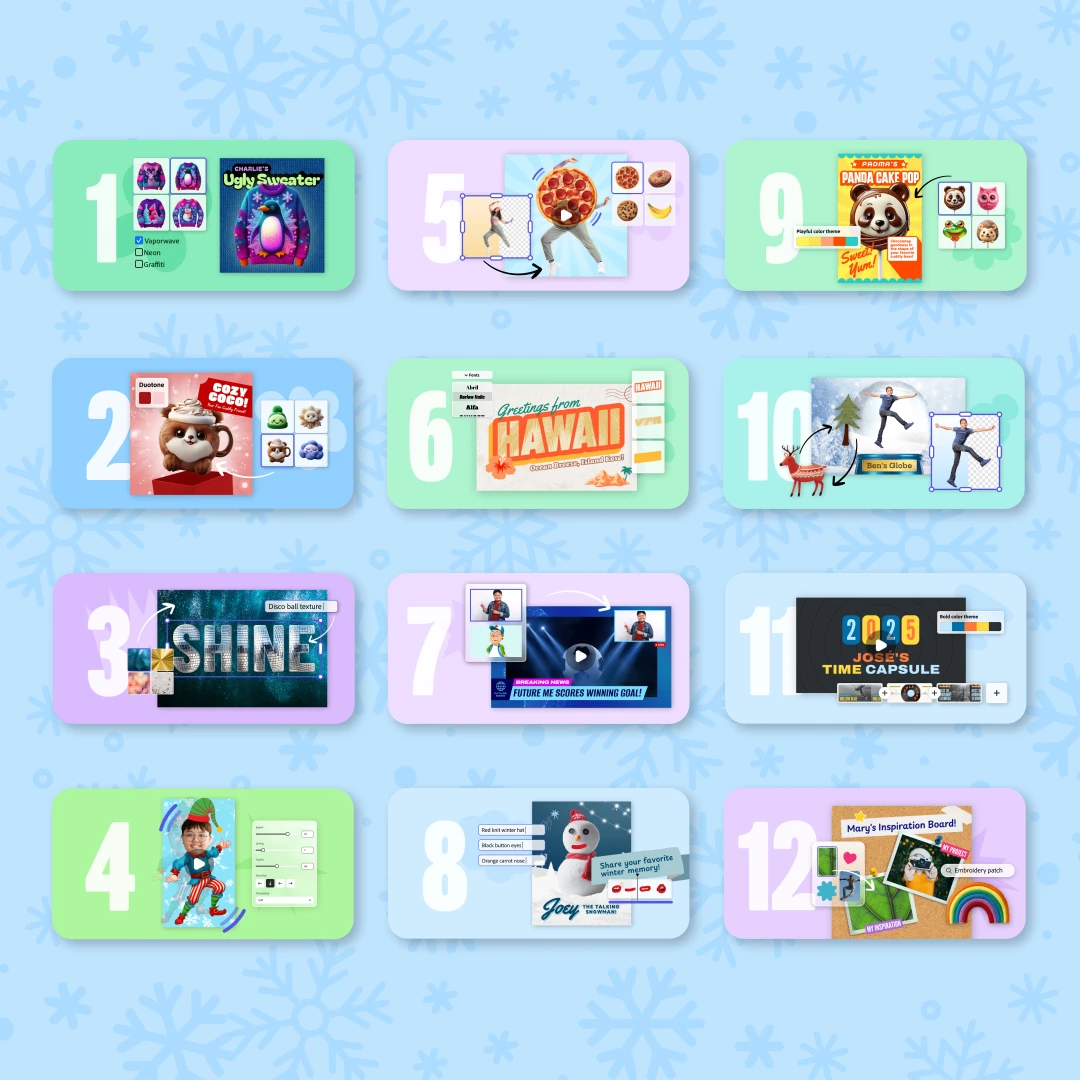
Not sure what to share? Try out one of the 12 Days of Creativity activities!

Pick a challenge and try it out today → https://adobe.ly/12DOC25


Each activity is designed to take 10–15 minutes, work with any grade level, and help students create something fun right away. Perfect for December library visits, class transitions, morning meetings, or quick creativity breaks.
12DOC_Campaign_1080x1080_Blue.png


Idea Sparks

Here are a few ways educators are already bringing the 12 Days to life:

  • Storytelling Moments: Have students narrate their Design a Stuffie or Vintage Postcard creations as character backstories.
  • Mini Presentations: Use Future You News Report or Talking Snowman as quick speaking + creativity warm-ups.
  • Community Displays: Invite students to add their Ugly Sweater or One-Word Wallpaper to a hallway “Creativity Wall” that grows each day.
  • Staff Lounge Smiles: Try Dancing Elf as a staff team-building moment. (You’re welcome in advance.)


Can’t wait to scroll through your posts and see the magic you’re creating with your students!!


With creative joy,
Your Adobe for Education Community Team

13 replies

Participating Frequently
December 2, 2025

I've decided to do a twitter thread of all of my themed creations. I'll post two today (I forgot yesterday), and then throw them up each school day! https://x.com/JustRimmey/status/1995897968419877333

Participant
December 2, 2025

This is so much FUN!  Day 1 is a blast and the kids love it!...um and I do as well clearly!

https://x.com/GreenScreenGal/status/1995894123346206798Untitled (14).png

Ann Kozma
Community Manager
Community Manager
December 12, 2025

It's been so fun seeing all your posts for 12 Days of Creativity!!!! Rocking them all, Erika! 

December 2, 2025

🌟 12 Days of Creativity – Day 2

Design Your Very Own Stuffie

By: R. Jason Smith, ACE Innovator

Welcome to Day 2 of the 12 Days of Creativity! Today’s activity invites students to step into the world of character design by building—and personalizing—their very own digital stuffie using Adobe Express. This activity is joyful, simple to start, and full of creative possibilities for learners of all ages.


🎨 Activity Overview

Design Your Very Own Stuffie encourages students to create a custom character from basic shapes using Adobe Express. They can experiment with:

  • Shape layering

  • Textures & patterns

  • Color palettes

  • Accessories

  • Expressions & personality

The final product can become a mascot, story character, SEL companion, writing prompt inspiration, or simply a fun keepsake of the season.

Public Activity Link:
🔗 https://adobe.ly/12DOCday2


🧰 How to Complete the Activity in Adobe Express

1. Start the Project

Open the Stuffie template in Adobe Express. Students can choose a basic shape or start from scratch.

2. Build the Body

Use shapes (circles, ovals, rectangles) as building blocks. Layer them to create the body, head, ears, arms, etc.

3. Add Personality

Students can:

  • Adjust colors

  • Add eyebrows, noses, eyes, and mouths

  • Use textures or patterns

  • Add clothing or accessories

  • Try different expressions to show emotion

4. Customize the Style

Encourage students to experiment with:

  • Drop shadows

  • Fun stickers

  • Seasonal elements

  • A name or mini bio

5. Export & Share

Students can download their Stuffie as a PNG or add it to another Adobe Express project (like a card, comic, or writing activity).

💡 Classroom Applications & Remix Ideas

📝 Writing Integration

  • Use the Stuffie as a character in a narrative story.

  • Create a “Stuffie Trading Card” with traits, powers, or backstory.

  • Pair with an SEL reflection: “How does your Stuffie feel today?”

🎁 Holiday Tie-Ins

  • Turn Stuffies into custom stickers or holiday cards.

  • Create a class “Stuffie Parade” slideshow or gallery walk.

🧠 Academic Tie-Ins

  • Use geometric shapes to talk about layering, symmetry, and composition.

  • Character analysis lessons: What choices make a character who they are?

  • Create mascots for classroom teams or table groups.

🎬 Project Remix Ideas

  • Animate the Stuffie using the animation tools in Adobe Express.

  • Turn it into a talking character with voiceover.

  • Make a comic strip featuring the Stuffie.

  • Design merchandise: bookmarks, posters, T-shirt mockups.

The beauty of this activity is its flexibility—low prep, high engagement, and tons of ways to integrate it meaningfully.


🌐 Student Gallery Link


Ann Kozma
Community Manager
Community Manager
December 5, 2025

You share such dynamic and inspiring content! Love the examples, love the insights, love innovation! Your academic tie-ins are great suggestion to extend the creative possibilities and support meaningful learning! Thanks for sharing this, Jason!