



Participant
December 9, 2019
Answered

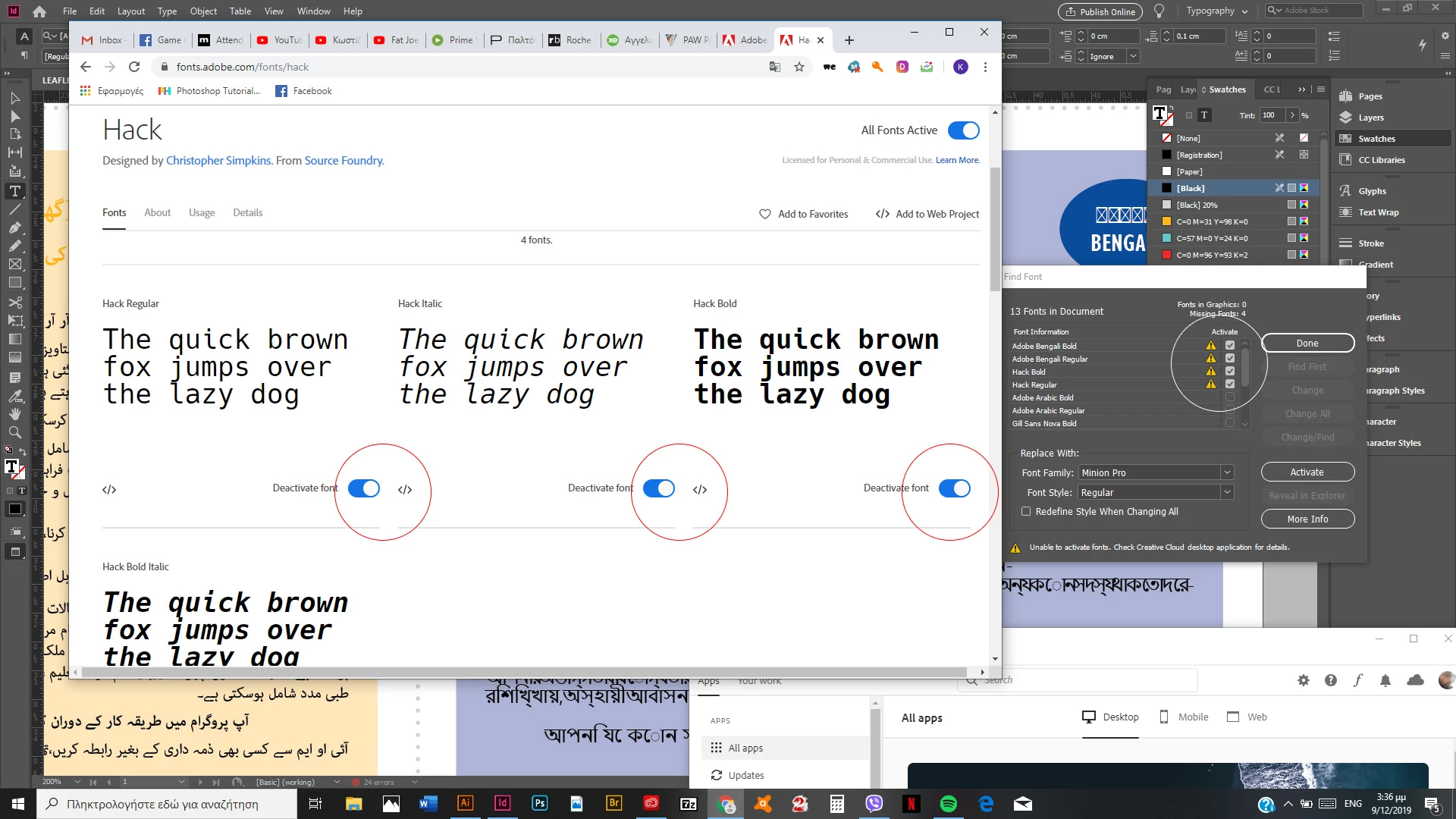
activated fonts on typekit, are not active on the apps.

  • December 9, 2019
  • 9 replies
  • 2134 views

Hi there

Any ideas at this problem?

Same issue as adobe Bengali.

Activated fonts on site, deactivated on the apps.
"Activate fonts" does not activate the fonts

NOTE: Although i can use unlimited fonts, i try to install not too many TK fotns.

Thank you in advance

This topic has been closed for replies.
Correct answer Dov Isaacs

There was a problem detected this morning at about 5am PST with the Adobe Fonts service due to an expired certificate on an internal server. The problem was resolved and this particular issue should not be affecting any users of the Adobe Fonts service at this point.


            - Dov

9 replies

Participant
January 5, 2020

I still have the same problem in InDesign.

Known Participant
December 15, 2019

It's December 15 and I'm having the same problem. Ever since my Adobe Desktop updated to the new interface, I've had to re-activate fonts every time I've opened my files. Usually, going to Typekit, deactivating, then re-activating resolved it. Not this morning. I've spent the last half hour trying to get started on a deadline, and nothing is working.

Participant
December 15, 2019

Fonts are not on. 
Not even an "activate" button on "find font".

Dov Isaacs
Dov IsaacsCorrect answer
Legend
December 9, 2019

There was a problem detected this morning at about 5am PST with the Adobe Fonts service due to an expired certificate on an internal server. The problem was resolved and this particular issue should not be affecting any users of the Adobe Fonts service at this point.


            - Dov

- Dov Isaacs, former Adobe Principal Scientist (April 30, 1990 - May 30, 2021)
Participant
December 11, 2019

Same problem start tonight 😞

Participant
December 9, 2019

The same issue today as well. 😞

Participant
December 9, 2019

Fonts are starting to load on my computer! Finally. 

ApvanR
Known Participant
December 9, 2019

Check!

Somebody hit the right button.

mariannak25048483
Participant
December 9, 2019

Same issue here, what a mess...

ApvanR
Known Participant
December 9, 2019

Same problem here. Always was afraid this might happen if I started to depend on TypeKit.

Participant
December 9, 2019

Yeah, it really is a mess. I have a project that I needed to complete today that's dependent on the fonts, and now I can't access them.

ReskThickhead
Participating Frequently
December 9, 2019

I think we will be in the same situation a lot...

ReskThickhead
Participating Frequently
December 9, 2019

Same problem here .... i tried deactivate fonts - it works but activating same fonts not working ... very annoying

Participant
December 9, 2019

Same here. Had Adobe support try to fix it via remote assistance. The agent tried a bunch of things, none of which were successful. In the end the agent confirmed that it was a known and reproduced issue that Adobe was working on.

Participant
December 9, 2019

Same problem!

danibembibre
Participant
December 9, 2019

Same problem. Very annoying. Used to work, now it doesn´t.
