


emilyj49862238
Participant
May 13, 2023
Answered

Acumin Pro web font overlapping

  • May 13, 2023
  • 1 reply
  • 705 views

I'm running into a strange issue with Acumin Pro ExtraCondensed Black. The font is preventing adjacent elements from being clickable.


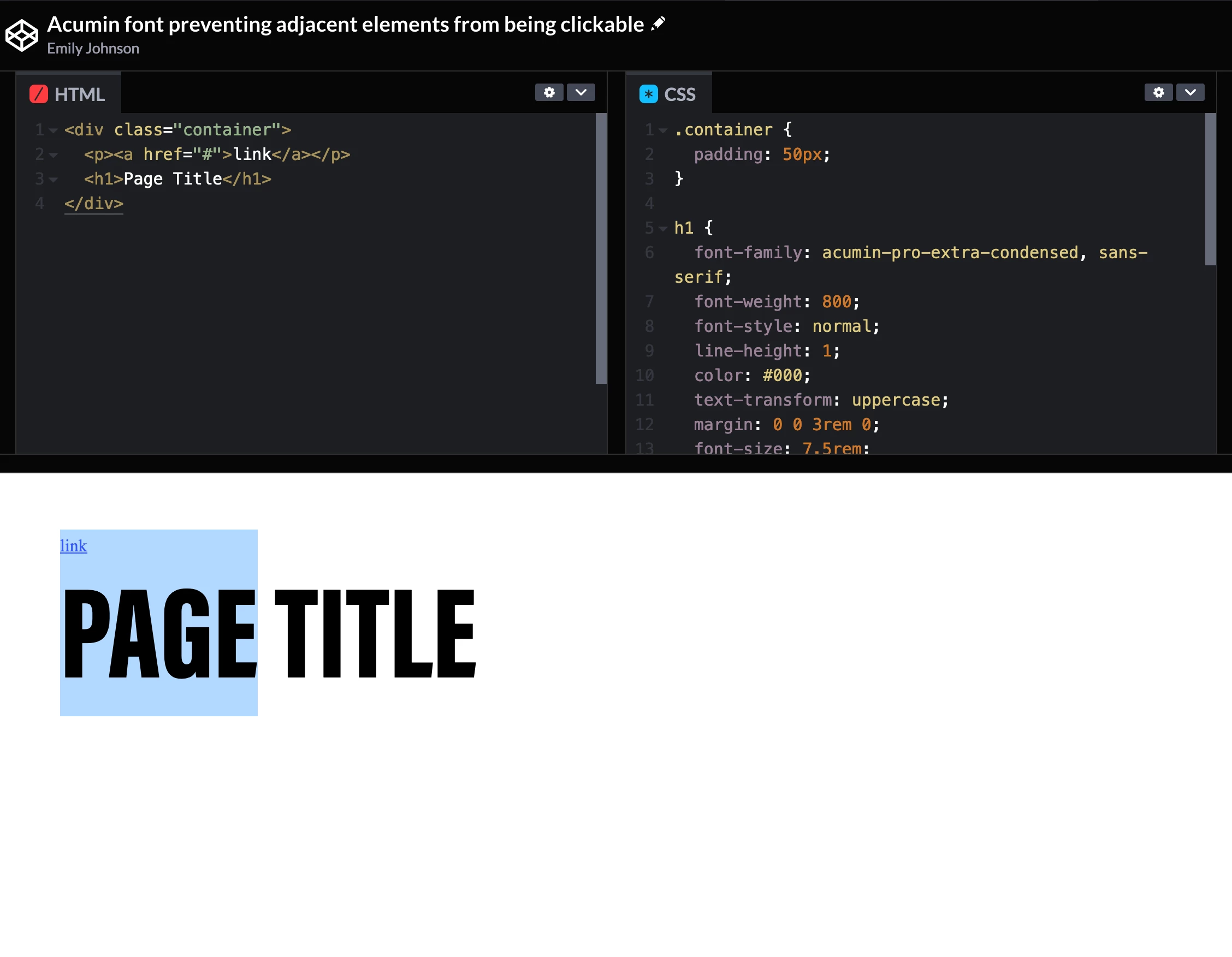
I've put together a simple codepen here: https://codepen.io/Emily-Johnson-the-bashful/pen/PoyadWq


You'll see a link directly above the H1. If you try to hover over the link, you'll see that the cursor doesn't turn to a pointer. It's as if the H1 is overlapping the link even though it shouldn't be - the line-height is 1 and there is no negative margin or any sort of positioning.

I've never seen this happen with any other Adobe web font. Any insight or a fix would be greatly appreciated. I simply need to position links above an H1 like I'm showing in the codepen.

This is also visible if you select the text with your cursor. You'll see that the selected area actually goes on top of the adjacent link even though it shouldn't.

 

    This topic has been closed for replies.
    Correct answer Neelamk

    Hi Emily,


    Welcome to our community forum. We are sorry for your difficulties. It looks like the measurements (metrics) for Acumin are generous which would explain the issue. We can look into the metrics and make sure there aren't any bugs with the font. In the meantime, you could try the below CSS, we were able to create a workaround by adding this to the <h1> tag:


    position: relative;
    z-index: -1;


    This tells the browser to put the h1 behind the link.


    Please let us know if this helps. Meanwhile, we will check with our backend. We will keep you posted.


    Regards,

    Neelam 

    1 reply

    Neelamk
    NeelamkCorrect answer
    Legend
    May 17, 2023

    Hi Emily,


    Welcome to our community forum. We are sorry for your difficulties. It looks like the measurements (metrics) for Acumin are generous which would explain the issue. We can look into the metrics and make sure there aren't any bugs with the font. In the meantime, you could try the below CSS, we were able to create a workaround by adding this to the <h1> tag:


    position: relative;
    z-index: -1;


    This tells the browser to put the h1 behind the link.


    Please let us know if this helps. Meanwhile, we will check with our backend. We will keep you posted.


    Regards,

    Neelam 

    emilyj49862238
    Participant
    May 17, 2023

    Thanks Neelam, that CSS does work as a workaround.

    Neelamk
    Legend
    May 18, 2023

    Hi Emily,


    Thank you for your response. I am glad to know it works for you. We will keep you posted if we find anything related to the bug or an update from the concerned team.


    Regards,

    Neelam