

JanePourazari
Participant
February 18, 2026
Question

Adobe Creative Cloud Font Mgmt Dialog Not Loading

  • February 18, 2026
  • 1 reply
  • 4 views

The Adobe Creative Cloud fonts screen doesn’t load, just spins. I see that this has happened to other folks prior to 2026 and have done everything recommend in the Adobe community help short of uninstalling all creative cloud apps, including trying the cleaner tool.

This is crazy. Have a heavy workload and this is the first chance I have had to try to solve this problem since it started January 16, 2026.

The irony of all of this, is that, since the 1990’s I purchased a lot of T1 font families, you know, the Adobe original postscript based typefaces, and they are unusable. Since January, luckily, the TT & OT fonts that I had purchased have sufficed, but today, I sure needed access to those that I sadly used from ACC.
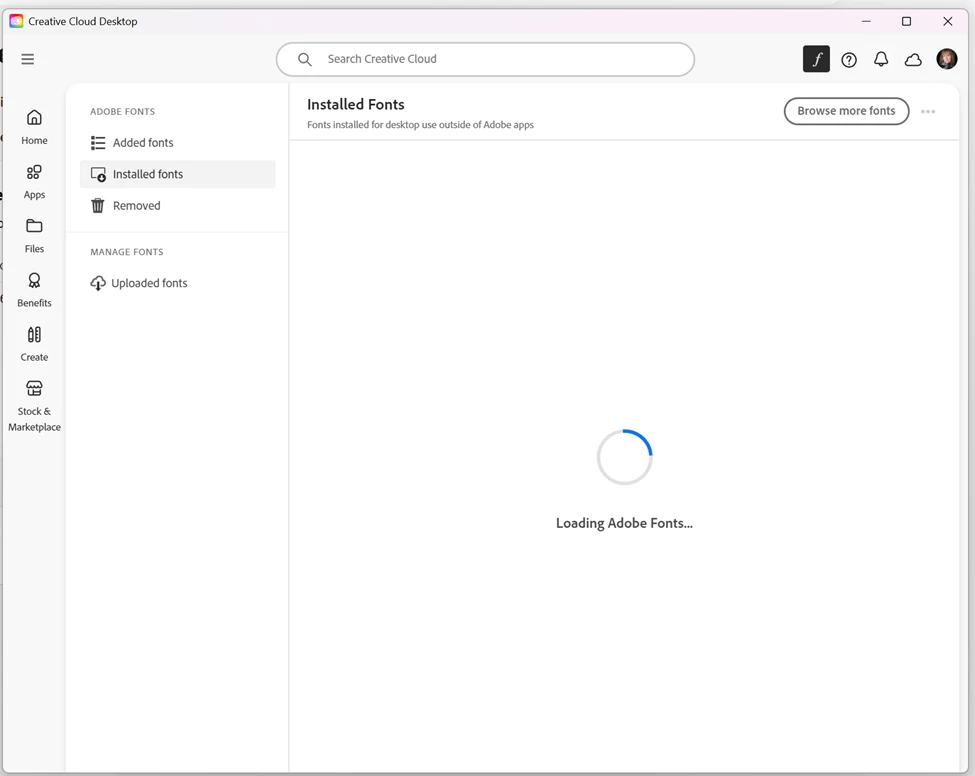
Am I really going to have to uninstall all my apps, then, uninstall ACC to resolve this?

I ran the Adobe Log Collector tool, but it keeps complaining it needs an internet connection, which, if you are reading this means I have one.

Finally, I do continue to get error messages such as this one after restarting my computer:
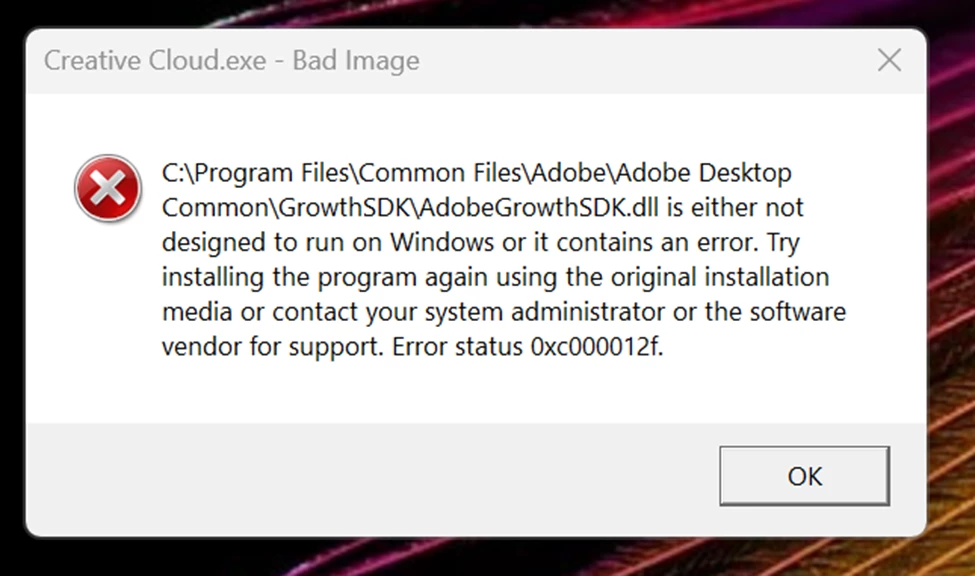
What is my next step?

Thanks if you got this far.

    1 reply

    Tarun Saini
    Community Manager
    Community Manager
    February 18, 2026

    Hi ​@JanePourazari,


    Thanks for reaching out! We’re sorry to hear about this. Could you please let us know the version of the operating system you are using?


    Did you try restarting the device to check if that helps? Also, if you haven’t already tried uninstalling and reinstalling the Creative Cloud Desktop app using the Creative Cloud Cleaner tool, I’d recommend giving that a try. Please reinstall only the Creative Cloud Desktop app afterward and let us know if that resolves the issue.


    Regards,

    Tarun


    JanePourazari
    Participant
    February 18, 2026

    I am running Windows 11 with the Adobe Creative Cloud Desktop on one device only.

    I have restarted my workstation many times after taking any of the actions listed here.

    1. I have used the cleaner tool with no change. The ACC app program resource file dates did update to the day I ran the cleaner tool (1/16/2026), but the problem persists. 
    1. I have attempted to uninstall only the Adobe Creative Cloud App and receive this error message:


    When I go to that location, the uninstaller executable is clearly there:

    1. I have used your LogCollector tool but have been unable to UPLOAD its results automatically. I can get through the error log building process, but, when it comes to the “upload” part, it does not detect an internet connection and abandons the process. I signed out of ACC, ran it again, then received the message that I must be signed into ACC (makes sense) to be able to UPLOAD. I sign back in (via internet connection), run the tool again, and it says it cannot find an internet connection. I tried to attach one of the LogCollector files here but it doesn’t seem to understand its file type (cannot “view” it in file manager.) Is there a manual way to send the LogCollector file to you guys?

    When the ACC app is open, I will randomly get this error message:

    After restarting my desktop, I will get this message:

    Additionally, when I look at my Adobe account, it seems like it thinks I am running Windows 10. Not sure that make any difference. Also, when simply updating my Adobe account to add a passkey (this is outside of Adobe Creative Cloud), I also received this error message:

    It is as though nothing is working as seamlessly as before.

    After reading through the HELP instructions concerning this issue (after trying everything else), the next step is uninstalling all Adobe applications, then uninstalling the Adobe Creative Cloud app. That means I lose all presets. Is this really all that is left to try?

    It feels like this problem is not fully understood. Many have reported it. Some have resolved it doing the things listed above, while others have not. What happens if I take all the time to uninstall all Adobe on my machine and the problem is still there?