
Participant
February 17, 2021
Answered

Adobe font not appearing in OneNote for Windows 10

  • February 17, 2021
  • 1 reply
  • 1667 views

So, I just activated the font "Adobe Caslon," and it seems to appear in basically every app except OneNote for Windows 10. Is there anything I need to do to get the font to work there?

OneNote 2016:
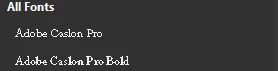
Word:

OneNote for Windows 10:
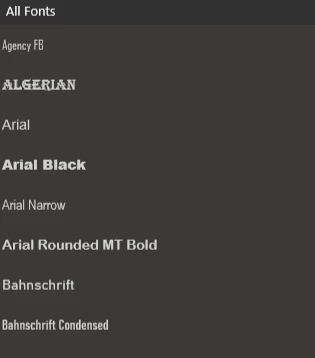
I also checked if the font was called just "Caslon," no luck.

The fonts appear in the font section of settings.



This topic has been closed for replies.
Correct answer Dov Isaacs

Complain to Microsoft.


OneNote apparently is filtering out anything except TrueType or OpenType TTF fonts for use in OneNote, precluding use of any OpenType CFF fonts. The vast majority of the fonts offered by the Adobe Fonts service are in fact in OpenType CFF format.


The only way to resolve this problem is for Microsoft to fix OneNote.


1 reply

Dov Isaacs
Dov IsaacsCorrect answer
Legend
February 17, 2021

Complain to Microsoft.


OneNote apparently is filtering out anything except TrueType or OpenType TTF fonts for use in OneNote, precluding use of any OpenType CFF fonts. The vast majority of the fonts offered by the Adobe Fonts service are in fact in OpenType CFF format.


The only way to resolve this problem is for Microsoft to fix OneNote.


- Dov Isaacs, former Adobe Principal Scientist (April 30, 1990 - May 30, 2021)
Participant
February 17, 2021

Good to know, thanks.

-Harry