
Participant
March 20, 2020
Question

Adobe Fonts

  • March 20, 2020
  • 1 reply
  • 521 views

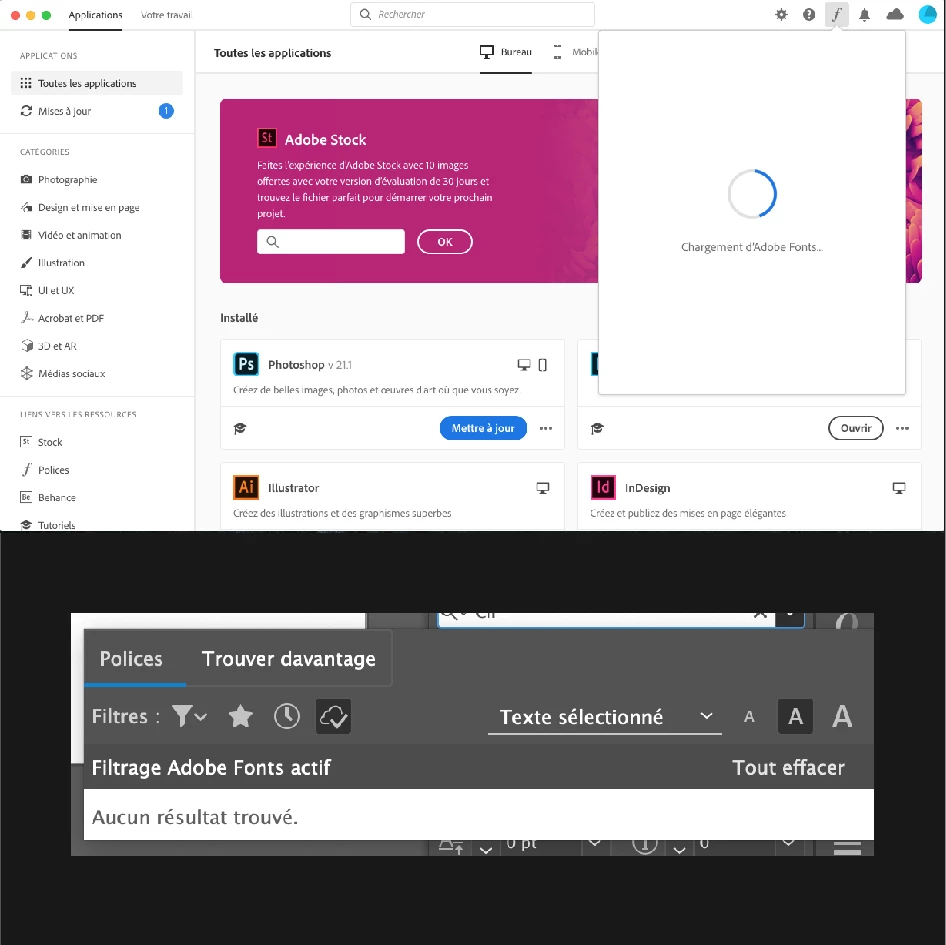
Bonjour, mes polices Adobe sont activés cependant elles n'apparaissent pas dans illustrator. Ma fenêtre Adobe fonts (sur l'app) ne s'affiche pas : elle est en perpetuelle chargement pourtant j'ai de la connexion. Savez-vous comment solutionner se problème ? Merci d'avance 
 

This topic has been closed for replies.

1 reply

Nancy OShea
Community Expert
Community Expert
March 21, 2020
  1. Click on your avatar (top, right corner) in Creative Cloud Desktop App.
  2. Sign-out of your account.
  3. Close all apps.
  4. Re-start your computer.
  5. Open Creative Cloud desktop app and sign-in with your paid ID and password.
  6. Post back if you need more help.
Nancy O'Shea— Product User & Community Expert
Participant
March 23, 2020

Hi, I have a similar problem. Fonts are not appearing (they seem to be eternally charging) evrywhere: CC app, Adobe Portfolio (see permanent error message and I can't change any font) , Adobe fonts Broweser page on adobe website, apps like photoshop (same message of user Pauline above). 

Note: My account was previousely linked with a card that stopped working (a photography contest gave me 1 year subsription as gift, one year later Adobe tried to take another payment from that card that is not mine. Plan was stuck in deactivation mode for months.


Now I have paid for a new plan, one year Photography Plan, but the fonts issue remains.


I have tried as you suggest but it's not working.