


Participant
October 30, 2021
해결됨

Adobe Fonts are showing as icon in Apple apps

  • October 30, 2021
  • 12 답변들
  • 16409 조회

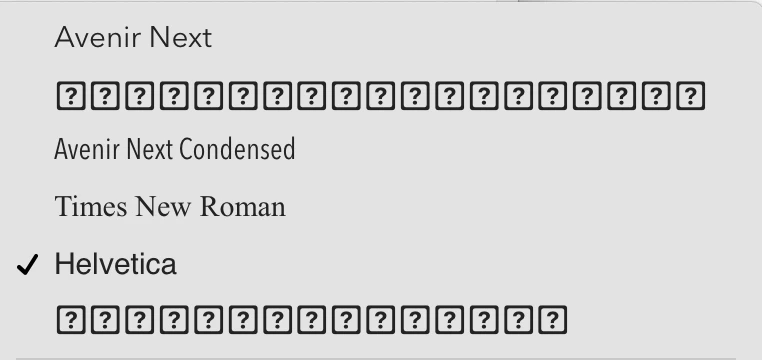
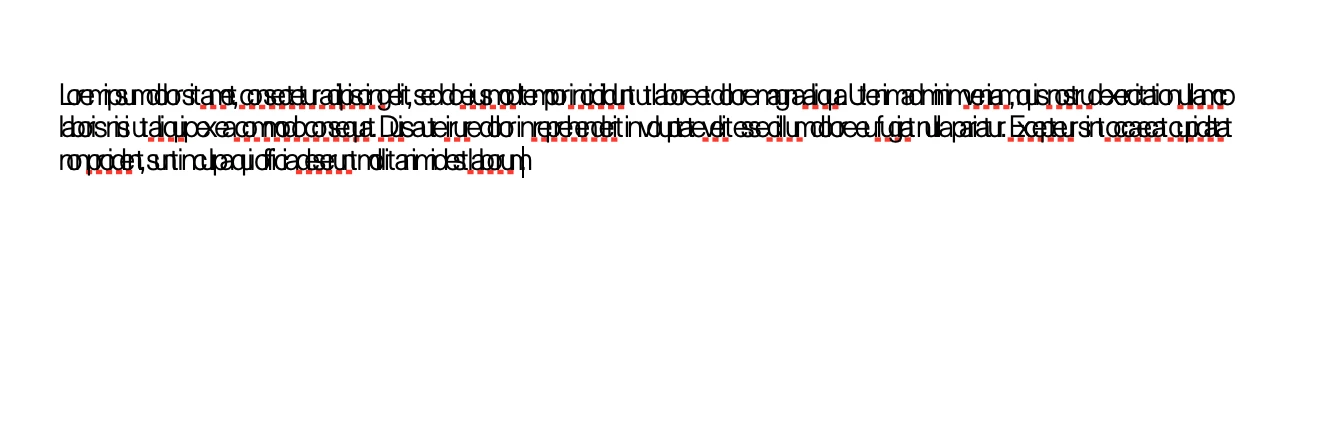
I am using Monterey 12.0.1 on apple silicon. Fonts downloaded from Adobe fonts work well in Adobe apps, however they are not working in Pages. The font list displays adobe fonts as boxes with question marks. When an Adobe font is selected the font displays with characters overlapping. I've attached photos to illustrate the issue. Any help on this problem would be much appreciated! (I've also reached out to Apple.)
 

<Title renamed by moderator>

 

이 주제는 답변이 닫혔습니다.
최고의 답변: Molly Doane

An update for MacOS Monterey 12.1 has been released and appears to fix the problem. If you are experiencing the issue described in this thread, please try updating your operating system and let us know if the problem persists.


Thanks,

Molly

12 답변

mjmetts
Participant
November 2, 2021

I'm having this problem too! Would be most grateful for some help. Screenshot from Keynote attached.

Molly Doane
Participating Frequently
November 4, 2021

Can you please confirm you're on Monterey 12.0.1 and tell me what type of machine you're using?

mjmetts
Participant
November 4, 2021

Yes, 12.0.1, MacBook Pro (14-inch, 2021)

Harshika Verma
Community Manager
Community Manager
November 1, 2021

Hi Harland0D4C,


We are sorry for the delay in response. I have escalated the issue to the team for investigation purpose and we will share the updates with you as soon as we hear back from the team.


Thanks,

Harshika