
Participant
July 19, 2019
Question

Adobe fonts not syncing

  • July 19, 2019
  • 3 replies
  • 429 views

I've activated a total of 53 fonts from the Adobe website, but only a handful showed up in the Creative Cloud (the sync option was on). I turned the sync option off, and then on, and pretty much messed everything up. Now all fonts, save for one, that had been previously available are unable to be activated. I did find a thread whose solution I tried to follow, but it resulted in this:
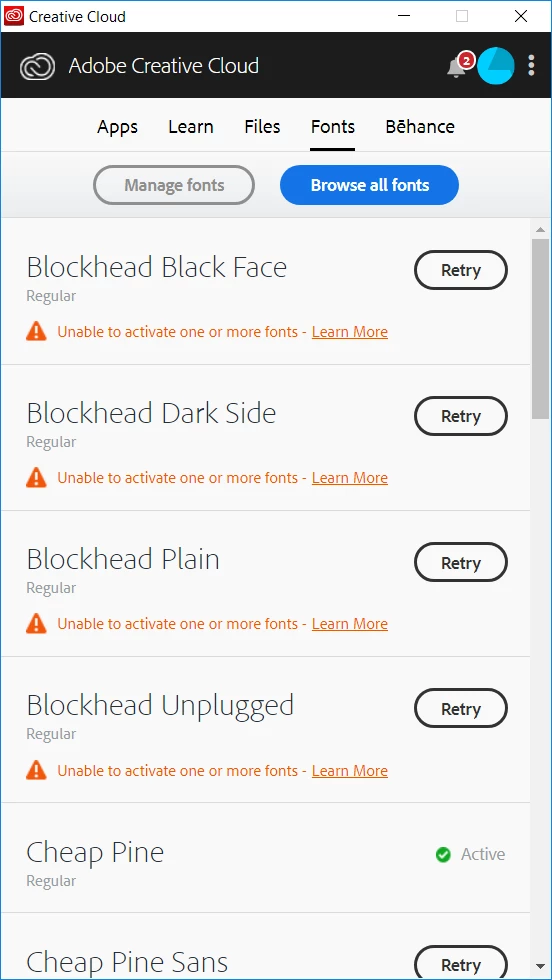
All 53 fonts are activated as seen on the Adobe Fonts page, but more than half of them isn't showing up, and the handful that is I cannot manually reactivate.

Any suggestion would be more than welcome! (I tried restarting the PC and nothing happened)

This topic has been closed for replies.

3 replies

Participant
July 25, 2019

After a while, the fonts refreshed and updated. Thanks!

HARSHIKA_VERMA
Community Manager
Community Manager
July 26, 2019

I am glad that you're back on track. Please feel free to reach out to us in the future for any query related to Adobe Fonts. We'd be happy to help.

Thanks,

Harshika

HARSHIKA_VERMA
Community Manager
Community Manager
July 25, 2019

Hi there,

Could you please confirm if you're still facing the issue or if you need more assistance on this? We'd be happy to help.

Thanks,

Harshika

July 20, 2019

Hi

Take a look here to see if it helps

Troubleshoot font activation problems in Creative Cloud