

Participant
April 6, 2025
Answered

Adobe Fonts session

  • April 6, 2025
  • 2 replies
  • 332 views

I would like to suggest some points of improvement in the Adobe Fonts part within the Creative Cloud desktop application.


1 - It would be ideal if we could search for fonts by simply typing their name into a search bar, even if only among those that have been added. It's such a simple thing that it doesn't make much sense that it hasn't been implemented yet. Having to access Adobe Fonts via the browser every time to search for a font eats up time.


2 - Please add a scroll bar that is always visible to the tab within the application. The current one only appears when we scroll and even if we click, it doesn't stay fixed.


3 - I suggest that in the Adobe Fonts part of the app, they don't show all the weights of the typography if we don't ask for it, or if we don't click on it. It's hard enough to find a font without a search bar, guys. Currently in my application, when I access the Adobe fonts window, all the font options are automatically expanded, making it much more difficult for someone who works with a lot of fonts to find what I need, even in alphabetical order.
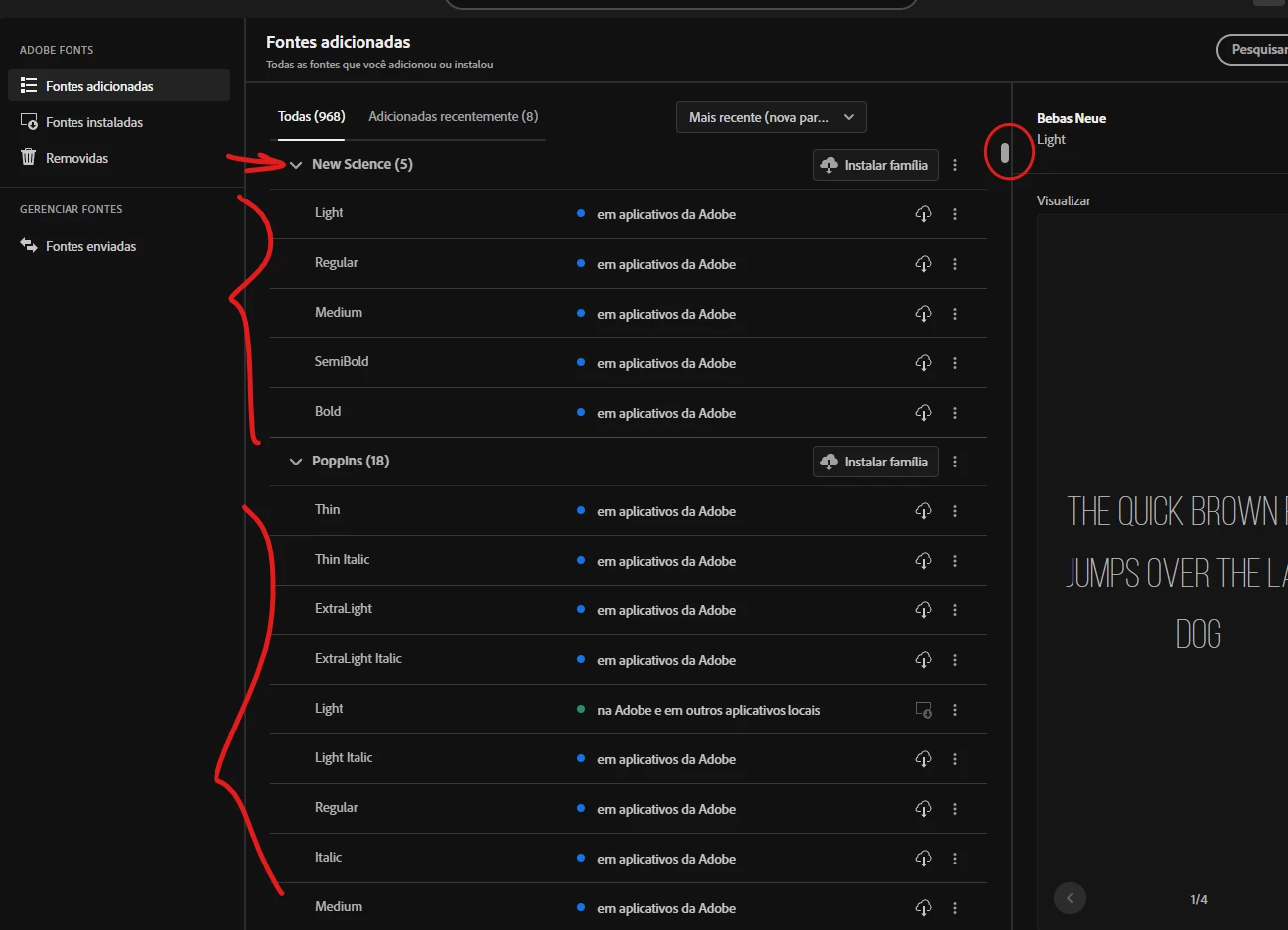
Those are my main ideas, I'd be happy if you thought of them. Thank you

Correct answer Bobby Henderson

I've been asking for the same improvements, particularly that stubborn scroll bar issue. I can't use the scroll bar at all with a Wacom pen/tablet setup. I'm forced to use the arrow keys on the keyboard to cycle through the fonts list. Of course that's a big pain when every type family in the list is expanded out showing all styles.

I'd suggest leaving a similar post about these issues at the Adobe Fonts User Voice site. The developers look at that site more often.
https://adobefonts.uservoice.com/forums/940222-adobe-fonts-feature-requests-and-feedback

2 replies

Bobby HendersonCommunity ExpertCorrect answer
Community Expert
April 6, 2025

I've been asking for the same improvements, particularly that stubborn scroll bar issue. I can't use the scroll bar at all with a Wacom pen/tablet setup. I'm forced to use the arrow keys on the keyboard to cycle through the fonts list. Of course that's a big pain when every type family in the list is expanded out showing all styles.

I'd suggest leaving a similar post about these issues at the Adobe Fonts User Voice site. The developers look at that site more often.
https://adobefonts.uservoice.com/forums/940222-adobe-fonts-feature-requests-and-feedback

YorhannAuthor
Participant
April 7, 2025

Oh man, it's really bad. Thanks for the tip, I'll do it

jane-e
Community Expert
Community Expert
April 6, 2025

@Yorhann 


I've moved your post from Creative Cloud desktop to the Adobe Fonts forum.


Jane


YorhannAuthor
Participant
April 7, 2025

@jane-e 


Thank you! I'm new to the community, so I wasn't sure where I should comment, since it's a problem within the creative cloud app.