
Participant
August 23, 2020
Question

Adobe fonts show up as heavy bold in Microsoft Word

  • August 23, 2020
  • 1 reply
  • 289 views

Hi there,

When I attempt to use Adobe fonts (for example Caslon or Garamond) in Microsoft Word for Mac 16.40 (20081000) they appear as quite heavy bold even when I have roman selected. See the attached screenshot:
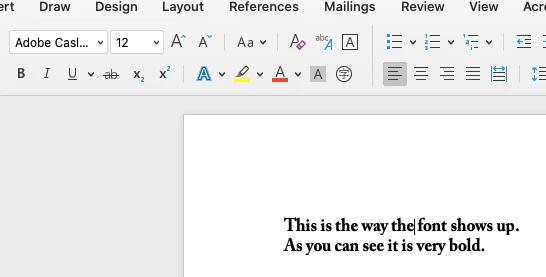
How can I view these fonts normally in MS Word?

Thanks!
C

    This topic has been closed for replies.

    1 reply

    Participant
    August 25, 2020

    I have a MacBook Pro and the Adobe Caslon Pro text in a Word document always displays as bold. It does not change when I select Regular font. As an attempted solution, I removed the Adobe Caslon Pro Bold font within Font Book, but when I go to Word and select Adobe Caslon Pro regular font, the text still appears as bold. The text does not change when I select the bold button either. I am using Microsoft Word for Mac 16.40. Existing documents using this font are now displaying in bold font. I do not have a problem with other fonts.