BarryWhitelaw
Known Participant
August 24, 2020
Answered

Adode Fonts & Monospace

  • August 24, 2020
  • 1 reply
  • 3182 views

Is there somewhere, that I'm not seeing, which advises whether a font on Adobe Fonts is Monospaced or not.


My chosen font was Dystopian however this isn't.


I need a font, that is plain(ish) however must be non-proprtionally spaced, so each letter (or boundary) is the same width.  


For example, 111 is the same overall width as 999

Fri Mon would be the same total width


I believe Courier is monospaced, but for my purpose, too plain..


thanks

    This topic has been closed for replies.
    Correct answer LinSims
    1. Go to fonts.adobe.com and sign in.
    2. Click Browse Fonts at the top left.
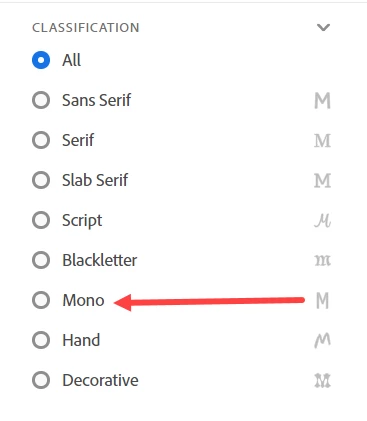
    3. In the left panel, scroll to Classification
    4. Select Mono

    The display will change to show only monospaced fonts.

    1 reply

    LinSims
    Community Expert
    LinSimsCommunity ExpertCorrect answer
    Community Expert
    August 24, 2020
    1. Go to fonts.adobe.com and sign in.
    2. Click Browse Fonts at the top left.
    3. In the left panel, scroll to Classification
    4. Select Mono

    The display will change to show only monospaced fonts.

    BarryWhitelaw
    Known Participant
    August 24, 2020

    Thank you. Completely missed that!