
Participant
February 7, 2020
Question

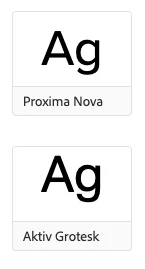
All projects with Aktiv Grotesk show the font being offset vertically. See images.

  • February 7, 2020
  • 5 replies
  • 11723 views

We recently updated our web projects to adjust some font options. Upon making the update, Typekit must have changed some configuration in the rendering and now ALL projects with Aktiv Grotesk, (that we've been using for at least 2 years) is broken.


For some reason, the font sits slightly higher than normal, and so all of our buttons and assets that show borders have the font sitting slightly too high.


This is a live commercial website, and the placements of our fonts contribute to presentations that we generate for our sales and client services team. We have no way that I know of to rectify this using just CSS. I'm sure we're not the only ones that will be impacted by this for those using Aktiv Grotesk.


See our buttons breaking:



See even on fonts.adobe.com how the Aktiv Grotesk font is sitting high above in the box.
5 replies

sta*ar
Participant
October 9, 2021

same problem here with aktiv grotesk in excel. additionally excel change the cellpadding if using german words with ä, ö, ü.

sta*ar
Participant
October 21, 2022

more then a year later and the issue isn't still solved.

gjfonts
Participant
January 14, 2021

I have a similar issue with Nobel but the baseline is too low.

I chnaged the style on this page: https://fonts.adobe.com/fonts/nobel to have a line-height of 1 and removed the padding. The font shouldn't fall below the container it is in and is messing up on a site I'm trying to code.

Participant
June 24, 2021

I have the same issue as the Original Poster with Aktiv Grotesk.   In Excel, the linespacing is about 50% too large.   


It appears that some weights of the font are set up with too high of a linesize, but I'm not sure how to troubleshoot that or report it to Adobe.

Participant
January 13, 2021

Having the same issues.

robertt56354294
Participant
October 5, 2020

Hello! I'm having that issue with a few fonts specifically in Firefox. I can't tell if it's an issue with the font itself or some communication with the FF browser, but a number of fonts shift up a instead of centering. Chrome and Safari are good. I'm not sure if this is a separate issue or related.

Participant
February 20, 2020

We have the same problem, hope it will be solved soon.


Best regards
Joe