Emac_trademark
Inspiring
September 14, 2023
Answered

Browse Adobe Fonts web page not displaying correctly in Google Chrome browser

  • September 14, 2023
  • 4 replies
  • 3149 views

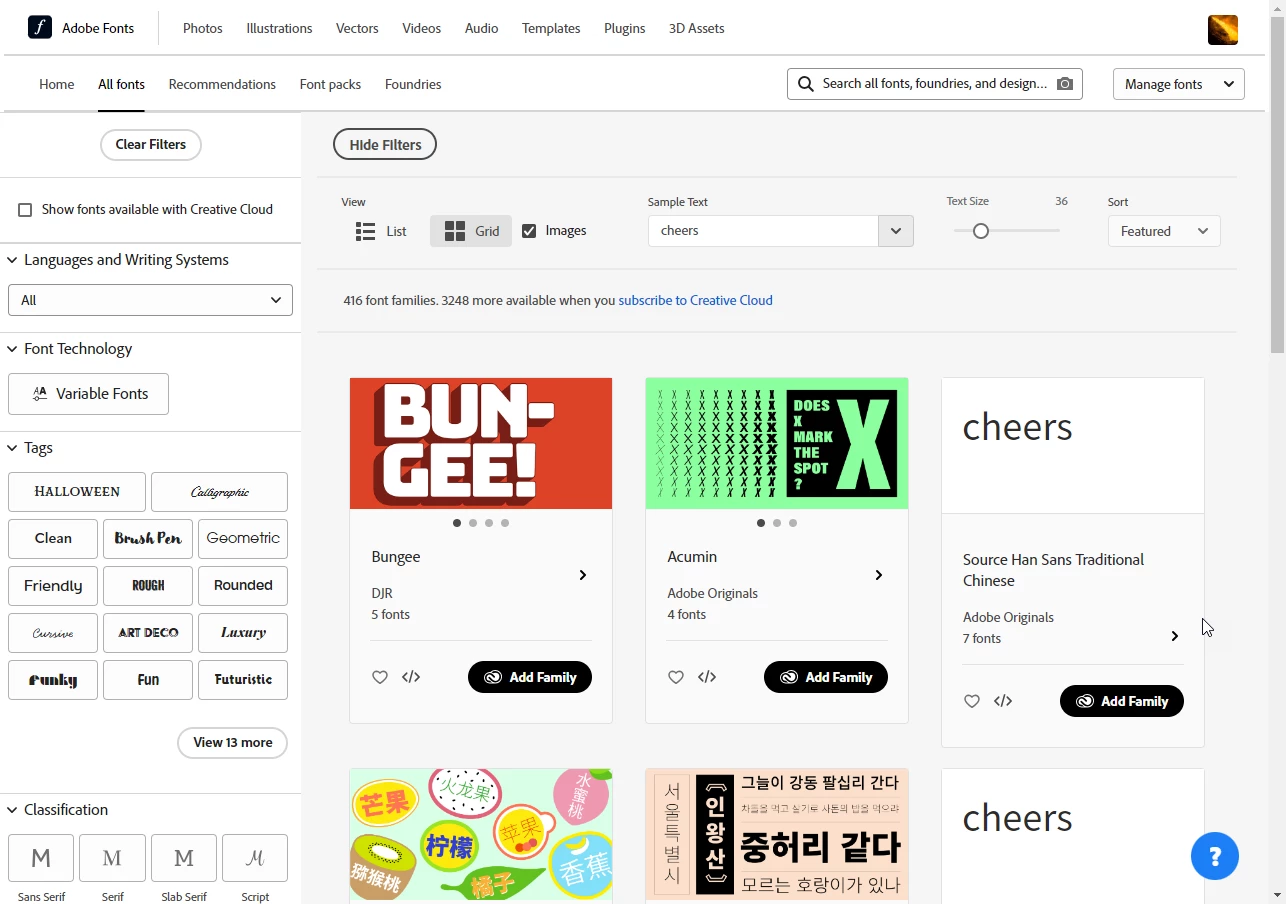
What is going on with this web page?  It displays like it should on other browsers, but I use Google Chrome as my main browser and am signed into Creative Cloud on that browser.  I am using Windows 10.


How do I get it to display correctly in Google Chrome?  Please see attached screen shot.

This topic has been closed for replies.
Correct answer Abambo
quote

It displays like it should on other browsers, but I use Google Chrome as my main browser and am signed into Creative Cloud on that browser. 


By @Emac_trademark

The main browser has normally all kinds of cookies, cached files and extensions installed. If, after cleaning up the coolies and the cache, you do not return to a normal view, I would, as a test, start your browser with all extensions disabled. If the site displays then normally, one of your extensions (guess: ad blocker) messes up with the fonts site. I can confirm that the fonts site is working with Google Chrome.

 

4 replies

Participating Frequently
September 18, 2023

Ugh, I feel you! Try clearing the cache or disabling some extensions. Chrome can be weird sometimes. 🤷‍♂ If that doesn't work, hit up customer support. Good luck, man! 🤞

Abambo
Community Expert
Community Expert
September 20, 2023
quote

Ugh, I feel you! Try clearing the cache or disabling some extensions. Chrome can be weird sometimes. 🤷‍♂ If that doesn't work, hit up customer support. Good luck, man! 🤞


By @Sajid317264442kye

Before contacting customer support, you still should try with a different browser. Disabling all extensions will also disable the culprit. So that's to try first: start the browser with no extensions and plug-ins: https://www.techsupportall.com/start-google-chrome-without-extensions/


ABAMBO | Hard- and Software Engineer | Photographer
Abambo
Community Expert
AbamboCommunity ExpertCorrect answer
Community Expert
September 18, 2023
quote

It displays like it should on other browsers, but I use Google Chrome as my main browser and am signed into Creative Cloud on that browser. 


By @Emac_trademark

The main browser has normally all kinds of cookies, cached files and extensions installed. If, after cleaning up the coolies and the cache, you do not return to a normal view, I would, as a test, start your browser with all extensions disabled. If the site displays then normally, one of your extensions (guess: ad blocker) messes up with the fonts site. I can confirm that the fonts site is working with Google Chrome.

 

ABAMBO | Hard- and Software Engineer | Photographer
Emac_trademark
Inspiring
September 19, 2023

It was indeed an extension, Super Dark Mode was the culprit.  Whats weird is that even though the extension was active, I didn't have it on for that site, but whatever, working now that I disabled the extension and found another dark mode, thanks all!

Participant
June 1, 2024

this comment just fixed it for me. And yes even though it wasnt active AND i added font permission AND i added it to the white list but it wasnt until i removed from chrome that font.adobe worked properly.

REMOVE SUPER DARK MODE


Community Expert
September 15, 2023

I have a similar setup on my notebook at home. The Adobe Fonts service displays properly in Chrome on my setup. All sorts of things can make web browsers go wonky. Usually if I encounter any issues I'll make sure the browser application is fully updated and then I'll look at cleaning out the browser's cache and even its history. Any third party plugins added to Chrome can be a variable for messing up the works. Make sure any of those are up to date.


Outside of the browser itself, it would be good to check if any updates are available to graphics card drivers and anything other piece of hardware that could possibly be relevant to the problem. Chrome is kind of a memory hog. So if your system has multiple applications open or just multiple browser tabs open that could possibly cause issues if the computer is suddenly sapped for system resources.

kglad
Community Expert
Community Expert
September 15, 2023

<moved from cc services>