



eric_johansson
Participant
May 15, 2026 6:34 AM UTC
Question

Cambria font, issues with line height on website

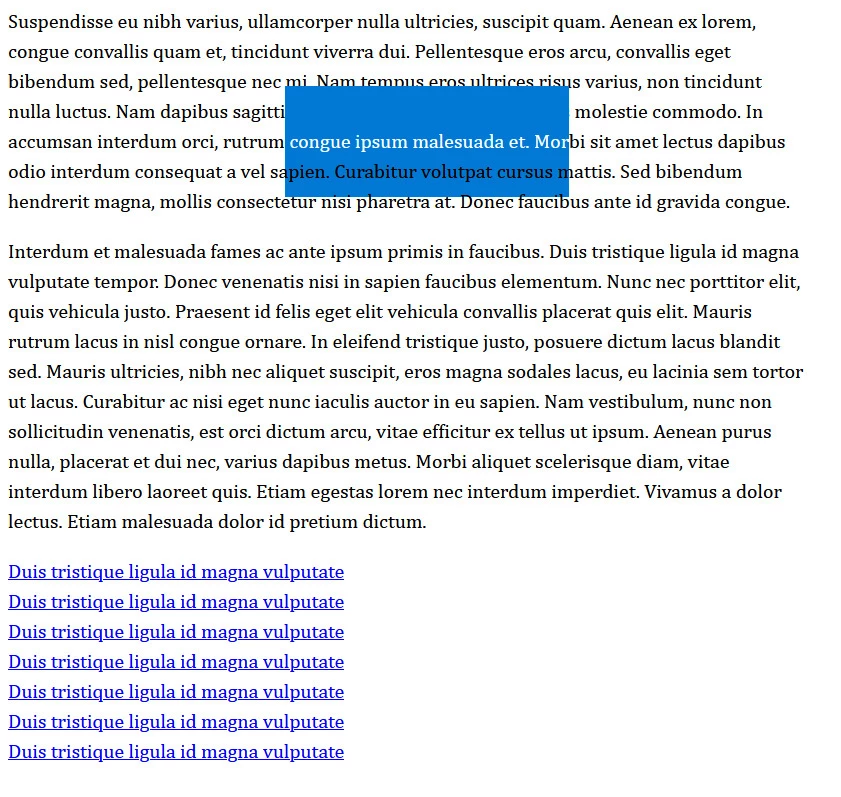
We are having some issues with line-heights regarding Cambria.


Even if I manually set the line-height I want and the text is displayed correctly, when you select the text or try to hover it you'll notice issues with the line-height being larger than it is supposed to be.


Try selecting the text (tested in Chrome, Edge and Firefox on PC) and you'll see what I mean. 


Also try to hover the links. Since the browser thinks the line-height is much larger, the area that "triggers" the hover effect is incorrect and you can't access some of the links because of overlap.


Here is a simple test page I made:https://devlab.ericj.se/me/_temp/font_test.html


    5 replies

    Participant
    Oct 23, 2026 3:33 PM UTC

    I also have this issue. 

    Translate
    Community Expert
    Oct 26, 2026 9:59 PM UTC

    Hi ​@nichart-dk,


    Thanks for reaching out! Are you experiencing the same issue with the same Adobe Font? Also,  which browser are you using?


    Best,

    Tarun 

    Translate
    Tarun Saini
    Community Expert
    Aug 12, 2026 3:41 AM UTC

    Isn’t Cambria a system typeface for the Windows operating system? I don’t think the typeface is related to Adobe (I’m pretty sure Monotype was involved in its development).

    Translate
    Tarun Saini
    Community Manager
    Community Manager
    May 18, 2026 8:45 AM UTC

    Hi ​@eric_johansson,


    Thanks for reaching out! We’re sorry for the delay and the experience you’re seeing. I have shared the information with the product team. Once I hear anything from them, I’ll keep you posted. Meanwhile, can you please share your Adobe ID with me via DM?


    Regards,

    Tarun


    Translate
    Participant
    Aug 11, 2026 11:16 AM UTC

    Hi! I'm having the exact same problem—how can I fix it?

    Translate