


Participant
November 4, 2025
Question

Can't sort my added fonts via tags

  • November 4, 2025
  • 1 reply
  • 72 views

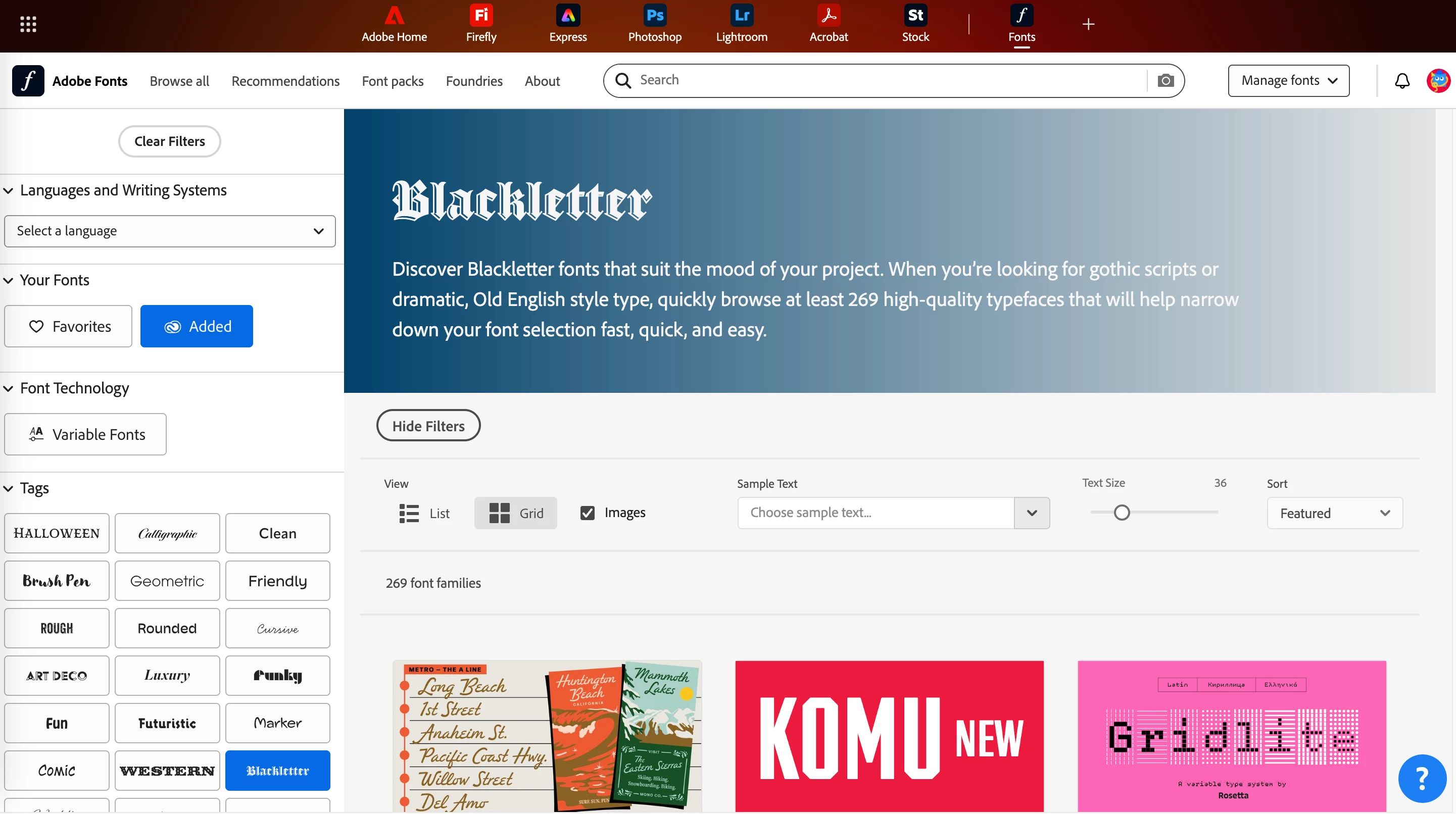
I'm trying to view the fonts I've added that fall under a certain tag. I can select "Added" to see all of my added fonts but when I select a tag nothing happens. No matter what tag I select, nothing gets filtered. The only thing that changes is the description/header of the tag at the top of the page, seen below. 

I thought I was able to do this at one point, maybe they've changed something??? If anyone has a better way of filtering fonts please let me know.
    1 reply

    Tarun Saini
    Community Manager
    Community Manager
    November 4, 2025

    Hi @RileyCreative,


    Welcome to the community! Please deselect the "Added fonts" option and then select the tag to filter it out.


    Please check this article for more information on tags- https://helpx.adobe.com/fonts/using/add-fonts-website.html


    Let us know if that helps.


    Regards,

    Tarun

    Participant
    November 4, 2025

    Hi Tarun,


    Is is possible for me to view which fonts I have added AND filter them by tag? For example, I want to view my added fonts that fall under the College tag. I don't want to view every single College tagged font–only the ones I have already added to my Creative Cloud library.


    Thanks!