
Participant
January 25, 2021
Answered

Can't upload font to Creative Cloud - Processing failed

  • January 25, 2021
  • 5 replies
  • 9438 views

I'm trying to upload a font I'm using in an XD project so it displays correctly on other devices. When I go to CC > Manage Fonts > Add fonts to Creative Cloud and try to upload the font there, it says 'Processing failed' but gives no indication of what the probelem is.

It's a pretty standard, single-style OTF font and I don't have any problems using the font in any applications, the only problem is trying to upload it to CC.
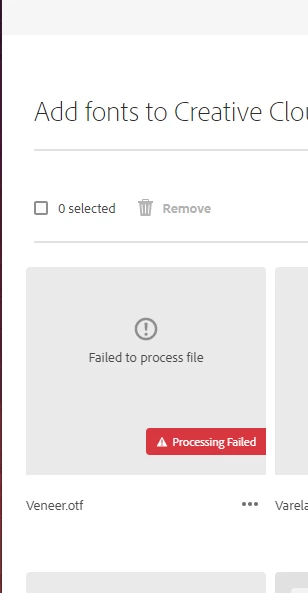
 

 Does anyone have any idea what the problem could be, or even if there's somewhere I can find a more detailed error message?

Correct answer Tarun Saini

Hi 

@Florian37254183ritr


Thanks for your patience. Please check this link and let us know if that helps- https://adobe.ly/4bLw7vP.


Regards,

Tarun

5 replies

Participant
July 2, 2025

I am having this same issue. I already extreacted the files from the folder, they are both OTF & TTF files and I still am receiving the same failed processing message. What else can I do?

Tarun Saini
Community Manager
Community Manager
July 2, 2025

Hi Koaliyah3553219694t7,


Welcome to the Community! If you're experiencing difficulties uploading fonts in the Creative Cloud application, there are a few troubleshooting steps you can try:

  1. Check font compatibility: Ensure that the font files you're attempting to upload are compatible with the Creative Cloud application. Different Adobe applications have specific font format requirements, so make sure your fonts are in a compatible format, such as OpenType (OTF) or TrueType (TTF).

  2. Restart the Creative Cloud application: Sometimes, restarting the application can resolve temporary glitches or issues. Close the Creative Cloud application completely and then relaunch it to see if the problem persists.

  3. Check for software updates: Ensure that both your Creative Cloud application and your operating system are up to date. Outdated software versions can sometimes cause compatibility issues or bugs. Update the application and your operating system if any updates are available.


Please check this article for more information:- https://adobe.ly/4lyVFRv


Let us know if that helps.


Regards,

Tarun

Participant
December 23, 2024

thanks for your tip, removing them from the zip drive folder is what fixed the issue for me!

Participant
January 29, 2023

I know this is an old thread but I wanted to add a solution I found for anyone else struggling with this problem,


Check to make sure your fonts have been removed from their zip folder. Extract the fonts and then move them to a separate folder. I put them straight into my documents folder and it worked. It's something I didn't think of until a friend pointed it out so try that and see if the fonts will process.


Best of luck!

kglad
Community Expert
Community Expert
January 29, 2023

@JxO2202 


thank you.

ArtsOfMemo
Participant
March 11, 2021

II have the same issue while euploading fonts to Creative cloud alone and my font filea are working else where.!

Can someone help with this?

ArtsOfMemo
Participant
March 11, 2021

**I have the same issue while uploading fonts to Creative cloud alone and my font files are working else where.!

Can someone help with this?

** - Have issues with the keybaord.! Hence, please ignore the typo.!

kglad
Community Expert
Community Expert
March 11, 2021

how are trying to upload fonts?

are you trying to upload one font at a time?  if so, how many fonts have you tried? 


have they all failed to upload? 


do the fonts work in all the adobe programs you've tried used them in and have you used the fonts in, at least, one adobe program?

kglad
Community Expert
Community Expert
January 25, 2021

that may be a corrupt font even though you don't have problems using it. 


use font software to check it.