

Scott Falkner
Community Expert
Community Expert
October 18, 2018
Answered

Cannot activate Typekit fonts

  • October 18, 2018
  • 1 reply
  • 2312 views

I have a Create Cloud subscription but I cannot activate fonts with Typekit. The Activate Fonts button is not available. Instead I see an option to "Subscribe to Creative Cloud to activate 48 more fonts.”  Again, I am subscribed and signed in.
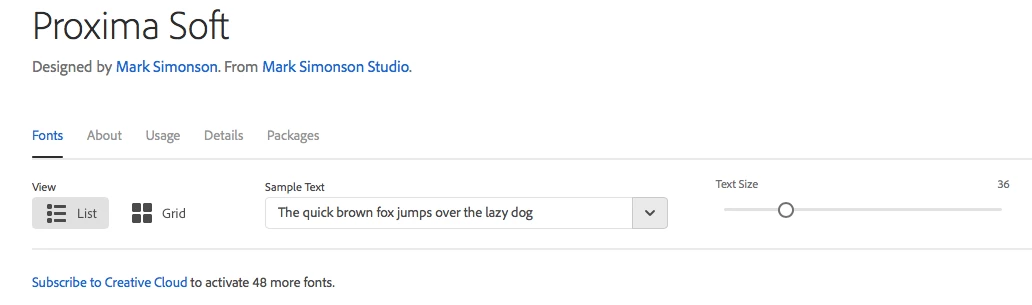
The font are using in an InDesign file I was supplied with. Opening it in InDesign CC 2019 presents this dialogue…
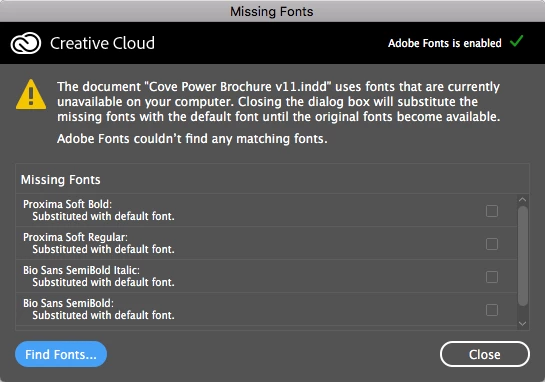
There is no way to tell InDesign to activate the fonts.

How do I activate Typekit fonts?

This topic has been closed for replies.
Correct answer liz, Adobe Type

Hi Scott,

I am sorry you didn't get my email reply; I will send it again now.  The problem is related to your Creative Cloud subscription info: I've put a fix in place on your account so you should be able to use the fonts you need now.

Best,

-- liz

1 reply

liz, Adobe Type
Community Manager
Community Manager
October 18, 2018

Hey Scott,

I'm sorry that you ran into trouble with this. Would you please email, and include the email address for your Creative Cloud subscription?  We'll check your account information and see why the fonts aren't available.

Thank you,

-- liz

Scott Falkner
Community Expert
Community Expert
October 18, 2018

Liz,

I did that already from the email my account is registered to. It is basically what I posted here, with some account info.