

CYY-PB
Participant
February 17, 2026
Question

Certain Fonts can't installed on iPad

  • February 17, 2026
  • 2 replies
  • 33 views

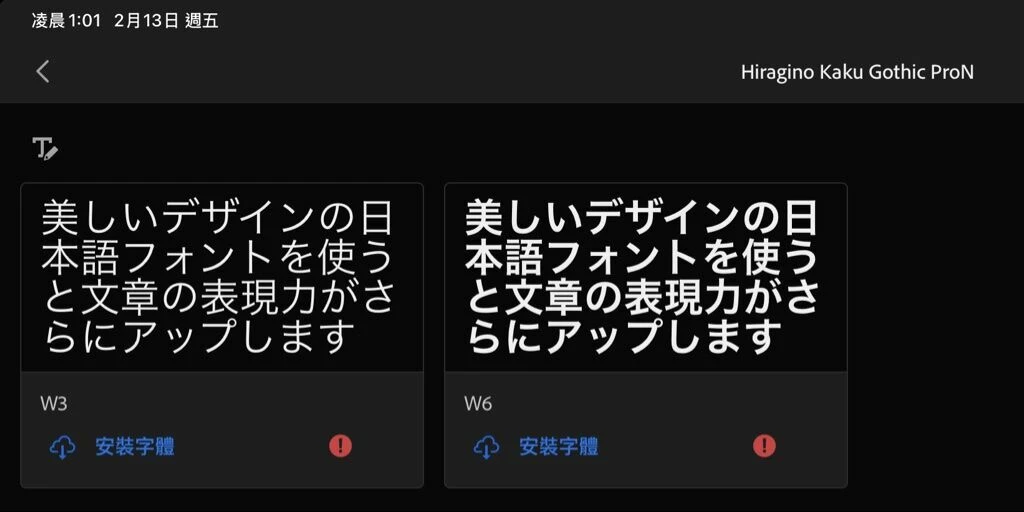
I can’t install the font Hiragino Kaku Gothic on my iPad, while other fonts installed without any problems. I used the Creative Cloud app to install it, but it’s strange that I can only use this font in Illustrator. I’m not able to use it in other apps on my iPad. I want to use this font in CSP (Clip Studio Paint).
 

    2 replies

    Community Expert
    February 19, 2026

    Unfortunately, Adobe Fonts only work in Adobe apps on the iPad platform.

    The iPad platform needs something equivalent to the Creative Cloud Desktop App that we use on computers running Mac OSX and Windows. The iPad used to have a Creative Cloud app, but the app was discontinued. In order to use Adobe Fonts in other apps not made by Adobe they have to be installed using the Creative Cloud app. We can do this on Mac and Windows computers, but we can no longer do that on an iPad.

    Tarun Saini
    Community Manager
    Community Manager
    February 17, 2026

    Hi ​@CYY-PB,


    Thanks for reaching out! We’re sorry to hear about the issue you’re seeing. Could you please let us know what happens when you are trying to check this font in other apps? Is it not visible? Did you check on the desktop to see if you can view these fonts under installed fonts in the Creative Cloud desktop app?


    Regards,

    Tarun