


Participant
Oct 10, 2019 10:08 PM UTC
Question

CSS embed + flex box + align items center ... font alignment inside line height is wrong adobe!

Hi,


im embedding my font Sofia Pro using Adobe fonts on my Bootstrap 4 website.


Now, i've came to the harsh conclussion that Adobe does not correctly align the webfont inside the line-height.


See examples:
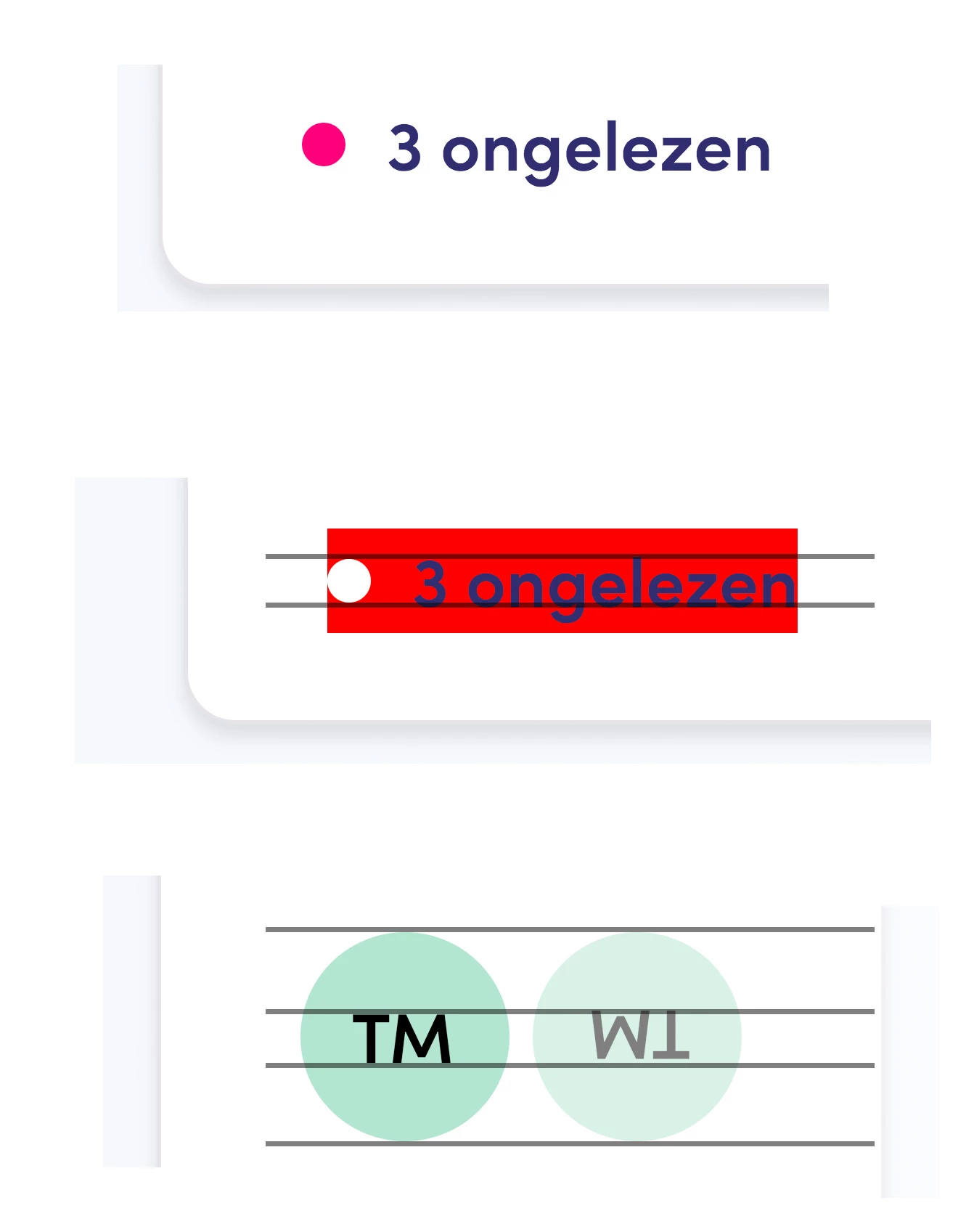


What this means: using flex-box align center (which aligns items in the real center of a plane) the objects are not visually centered with the text, because Adobe messed up the placement of the font inside the line-height.


I cant use margin-top: -1px on ALL the items to fix this problem. Which would result in a lot of css selectors.


Please fix the font. I've seen this problem before creating webfonts. It has usually something to do with the compression and placement of pixels which lowers the font inside the line-height.


Please fix 🙂 thank you.

    15 replies

    Participant
    Mar 5, 2022 7:07 AM UTC

    I contacted the type foundry over Twitter. they got back with good news.

    "Hi Matías. I have made new line-height for Sofia Pro Below a test with buttons with one line and 2 lines."


    I haven't tested the font yet as I ended up downloading it from myfonts.com. ¿Can anyone confirm the new line height is working when serving Sofia Pro from Adobe? Thanks

    Translate
    Participant
    Oct 5, 2023 10:19 AM UTC

    I'm facing the same issue and can confirm it is NOT fixed yet in Adobe, even though the creator of the font files updated the fonts over a year ago.

    Translate
    Participant
    Nov 1, 2023 12:01 AM UTC

    We are facing the same issue and would appreciate any update on this. I will also reach out to Adobe support team and update here again if we get any leads on it.


    Translate
    Participant
    May 4, 2021 10:11 AM UTC

    Hello we are also having this issue, causing us a real headache. Can anyone from Adobe look into correcting it please??

    Translate
    Legend
    May 4, 2021 10:25 AM UTC

    Although Adobe include the font in their offering, it isn't a font they made. I imagine they cannot fix fonts made by other foundries. I suggest you contact the original font foundry. It may be that they fix it, and that one day (perhaps) the fix would come into Adobe's offering. https://fonts.adobe.com/foundries/mostardesign

    Translate
    Participant
    May 4, 2021 10:41 AM UTC

    Thanks for the response. I have contacted the author so let's see what happens 🙂

    Translate
    Participant
    Feb 3, 2021 9:20 AM UTC

    Hello, we are having the same problem with the Sofia Pro fonts. I would love to see a fix for this as well, as it makes the font useless in some applications.

    Translate
    Josh Baron
    Participant
    Jul 23, 2020 3:39 PM UTC

    Hello, did you get a reply or answer to this issue? We're also having this issue in Figma and website.


    Thank you!

    Translate
    Participant
    Jul 23, 2020 4:06 PM UTC

    nope, its not fixed. 


    Translate
    Participant
    Jun 18, 2020 2:22 PM UTC

    Hello, we encountered the same issue on our web services & design files. Sofia Pro from Adobe services is broken.
    Is it possible to do anything to solve the problem? Thanks a lot!

    Translate
    Inspiring
    Jun 18, 2020 2:51 PM UTC

    The baseline shift problem seems fairly common but noone from Adobe has bothered to reply about the problem. I've posted here too - using "Obviously" font and there's a clear unwanted baseline shift down by a pixel or two - very cldear in buttons and pulldowns. Will this ever be addressed or even acknowledged?

    Translate