



Does a variable concept font not do "special characters"...?
(upd.: Myriad VC seems the only one with the problem)
I love the variable concept font(s).
I've read last year's page about the new text engine that seems to boast how things simply work for about any language now...
However, if I simply want to use a character commonly used in French, I've already seen three different results...
- it becomes a box with an X in it
- or just that character doesn't change its properties
- or that character and everything that follows behind it don't change their properties
An example:
- I make a new document
- I select the Text Tool and in the toolbar select Myriad Variable Concept; Semibold; Crisp, and start typing
One of the possible results:
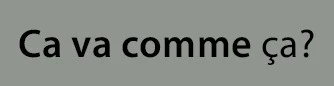
The ç and everything after it do not become semibold, nor inherit changed properties.
In the Type layer panel, I notice the font field becomes empty after I pressed Enter on the text with the ç...
If I exclude the ç, it keeps saying what it should.
If I change the empty field to Myriad Variable Concept again, I get this...
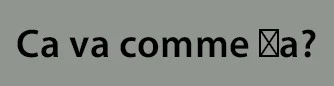
In Win 10, I usually use this Azerty keyboard...
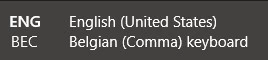
(I don't know why it also mentions English (United States). This was more clear in Win 7. It works fine for anything else than Variable Concept fonts. I mean, the bug is not in the keyboard, IMO.)
Do variable concept fonts only do the "American alphabet," or do I need a hint? 🙂
(Win 10 PS v23.3.1)
UPDATE: I've cursored through all the fonts that come with PS and Win 10, including about 9 Variable Concept fonts. All work well, except Myriad Variable Concept....
 AdChoices