

Inspiring
November 20, 2019
Answered

Duplicated font issues within Windows 10

  • November 20, 2019
  • 1 reply
  • 1553 views

Hi there,

I have a problem where an AE file is automatically activating Open Sans Semi bold from Adobe fonts.  I already have all the open sans installed locally and so when I open my AE file, all the semi-bold text is resorting to Times New Roman meaning I have to change all the fonts every time I open it.


I've tried resaving the file having specified the local version, then deactivated the open sans in adobe fonts, but whatever I do, when I reopen the issue remains and the font is reactivated.


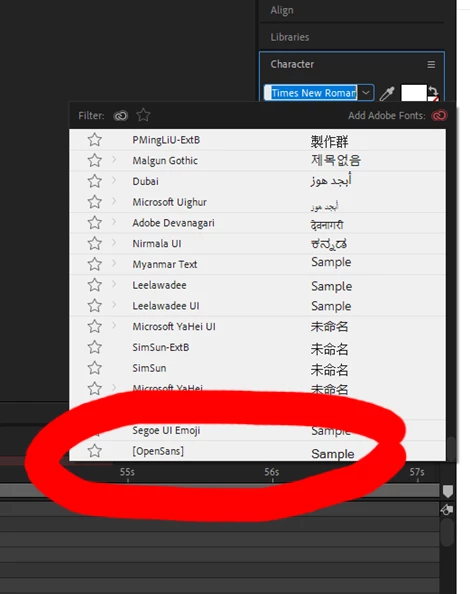
It appears to be the opensans at the bottom of the list (see attached) that is Adobe one but why is it there and why is it not noted as Semi-bold if that is the one activated?

 

This topic has been closed for replies.
Correct answer Theresa J

AE appears to be looking at Adobe fonts to activate fonts, before searching your system. Have you considered uninstalling Open Sans from your system and just using the Adobe font version of it?

1 reply

Theresa J
Community Expert
Theresa JCommunity ExpertCorrect answer
Community Expert
November 20, 2019

AE appears to be looking at Adobe fonts to activate fonts, before searching your system. Have you considered uninstalling Open Sans from your system and just using the Adobe font version of it?

darkcurvAuthor
Inspiring
November 21, 2019

That's done the trick, thanks.


I'm just wondering if there is a way to stop this in the future.  I'm often using projects from other artists and if I have the fonts on my machine, but they have used Adobe fonts, I'll have to go through this everytime.