Participating Frequently
September 13, 2024
Question

Ē not displaying properly on Website and Klaviyo

  • September 13, 2024
  • 4 replies
  • 1247 views

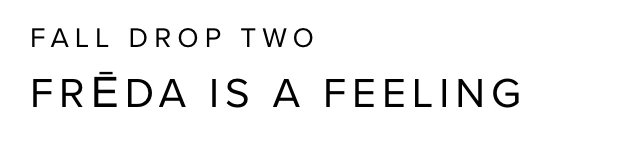
Hello, the Ē in Proxima Nova is not displaying properly on Website and Klaviyo.  Anyone have an idea why?

    This topic has been closed for replies.

    4 replies

    Participating Frequently
    October 1, 2024

    For anyone still interested I believe I solved this by going into the web project and clicking "all Characters" which is off by defualt. 

    Community Expert
    September 18, 2024

    I don't understand why the Ē glyph in Proxima Nova would be getting enlarged in a particular web browser or email application. I've tested the font in Adobe Illustrator and a couple other non-Adobe applications and the Ē glyph appears normal in strings of text and in the Glyphs palette. I also compared it to the Ē in Proxima Vara (a variable version of Proxima Nova not available in Adobe Fonts). The Ē looks identical there and sized properly.


    Does this glyph re-sizing error occur with any other letters that have diacritical marks? What happens if you change the typeface? I'm wondering if there could be some sort of code glitch or something causing the letter to be re-sized. The glyph in the font file has normal size dimensions.


    The first trouble-shooting step I would try is removing Proxima Nova from activated Adobe Fonts and then adding/installing it again. You could also try deleting the Font Cache .dat files, forcing the computer to re-build them.
    https://helpx.adobe.com/fonts/kb/troubleshoot-fonts-illustrator-indesign.html

    J E L
    Community Expert
    Community Expert
    September 18, 2024

    @Bobby Henderson, thanks, I was going to ping you! It's a good idea to reinstall and clear the font cache … I was also thinking that changing the font size to something overly large would determine if it was a scale problem. But I don't know why it would only change appearance in web or email applications, either. Strange!

    Community Expert
    September 18, 2024

    I wonder if the issue could be specific to the applications in question. Do they give glyphs with diacritic marks some sort of special treatment?

    Participating Frequently
    September 14, 2024

    Not sure why I would have to adjust the Ē. If you go to the Proxima Nova font on Adobe it displays fine. I also don't have the ability to adjust HTML text. I believe perhaps something is wrong with the font file itself? 

    J E L
    Community Expert
    Community Expert
    September 16, 2024

    You don't have to adjust the E character with that mark. It lines up properly in the letter space allotted for all each character in the font. But if you want it to line up differently than how it was designed, that letter will need to be adjusted separately. I don't think anything is wrong with the font file at all. You could reach out to the designer directly if you think there is a mistake (https://www.marksimonson.com/info/contact ). 

    Participating Frequently
    September 16, 2024

    But the E is clearly much bolder and not part of the font family. that is my problem. 

    J E L
    Community Expert
    Community Expert
    September 14, 2024

    Hi @Tim30167909rjrm, I believe you will need to adjust the font size of the "E" accordingly. In my example (I'm using Illustrator for my demo), in order to have the letters appear the same height, the letters "FR" and "DA" are set to 130 pt and the "E" is set to 150. That's just the way that particular macron mark (or whatever diacritical that is supposed to be) was designed for Proxima Nova. If they are all set to 130 pt, the letter will appear smaller. This should be the same for web display, but keep in mind not all browsers may render it the same. Hope that's helpful.
