
Participant
October 29, 2019
Answered

font missing in Adobe CC

  • October 29, 2019
  • 1 reply
  • 1055 views

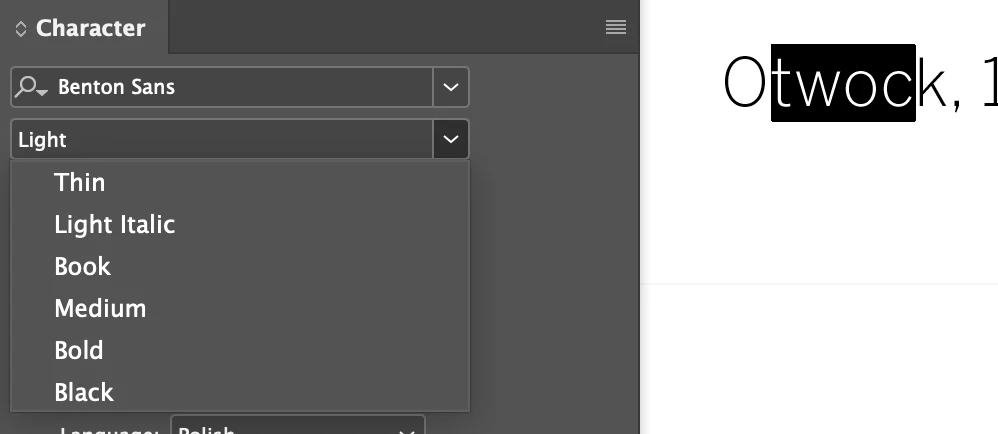
Hi, few days ago I noticed that I can’t find certain weight of installed font in fonts menu of every CC app . Font is correctly active in TypeKit. But, when I’m opening .indd doc with this font weight used, there is no font missing! Font weight is correctly available in any others (no Adobe) apps. Any ideas?
 

    This topic has been closed for replies.
    Correct answer mdbart

    I am on a mac and it's an OTF. I actually just resolved this issue after 2 days of trial and error. I ended up removing the "book" version of the font from my user/library/fonts folder and then redownloaded the just the book version of Futura Std from the font foundry and reinstalled it. That seemed to resolve the issue. Thanks.

    1 reply

    Participant
    October 30, 2019

    Hey...wish I had an answer for you, but  I am having the exact same issue. The only difference is the font family is installed directly on my machine. My issue specifically is with Futura std. No adobe CC products will recognize Futura std book even though it is correctly installed. I tried uninstalling fonts, programs even reverting to an older version of InDesign. Nothing seems to work. 

    Inspiring
    October 31, 2019

    What filetype is your Futura Std? Are you working on Mac or PC? 

    mdbartCorrect answer
    Participant
    October 31, 2019

    I am on a mac and it's an OTF. I actually just resolved this issue after 2 days of trial and error. I ended up removing the "book" version of the font from my user/library/fonts folder and then redownloaded the just the book version of Futura Std from the font foundry and reinstalled it. That seemed to resolve the issue. Thanks.