

Kelli Jae Baeli
Inspiring
June 5, 2026
Question

font previews not showing on adobe fonts page

  • June 5, 2026
  • 2 replies
  • 32 views

Lately, the font preview is not showing on the adobe fonts page. Therefore, I can’t choose a font for download, because I can’t see what it looks like. All the fonts look the same.
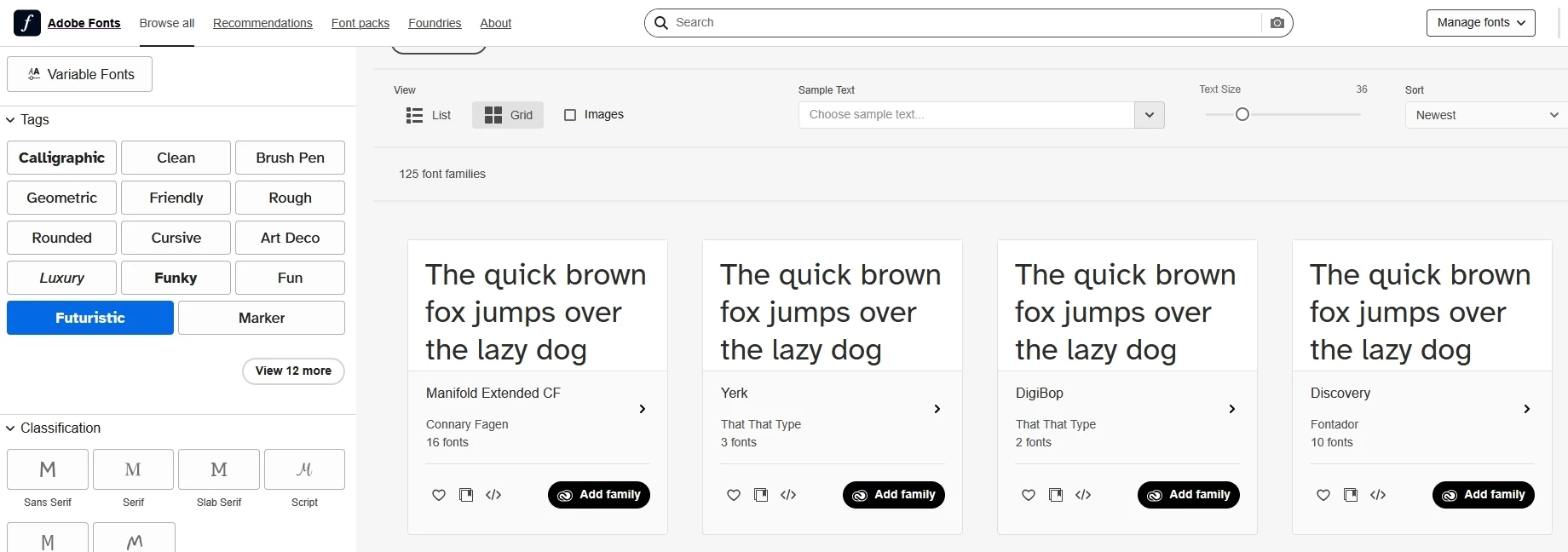
I’ve tried all the troubleshooting, and nothing makes the examples/previews show again.

    2 replies

    Community Expert
    June 11, 2026

    If you haven’t already done this I would try clearing the web browser’s data cache or log in using a different web browser.

    Kelli Jae Baeli
    Inspiring
    June 12, 2026

    Already tried that. Didn’t work.
    And i can’t use a different browser. My work flow is specific and depends on how i have things set up. If it doesn’t work on Firefox, i think that’s an Adobe issue, not a Firefox issue. My browser works in every other way on every other site.

    Community Expert
    June 14, 2026

    Can you clear your web browser’s history, or basically everything it has downloaded and stored? It sounds to me like there is some bit of corrupted data in there.

    Ton Frederiks
    Community Expert
    Community Expert
    June 6, 2026

    @Kelli Jae Baeli Works fine for me, maybe it was just a temporary glitz. If not, you may want to post your problem here: https://community.adobe.com/adobe-fonts-433