


Participant
December 14, 2023
Question

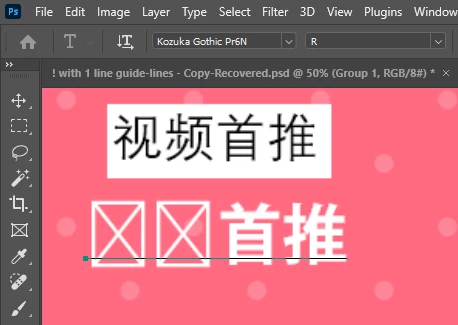
Fonts some letters are showing as Cross (cross)
  • December 14, 2023
  • 3 replies
  • 1528 views

As you can see here, I'm using the "Kozuka Gothic Pr6N" font. In this screenshot, the upper one is screenshot, and the below one is a text that I'm using. Client gave me the font specifically to use but two of the letters are working perfectly fine but two are not. I just want to use them, I can't even replace them as the client told me specifically to use them. So yeah is there any way to make these letters work. I hope someone will help me out on this one. Thank you!

This topic has been closed for replies.

3 replies

Abambo
Community Expert
Community Expert
January 3, 2024

Not all asian fonts support all possible characters. I've seen this especially with Japanese characters when using them on Chinese text. Only the Chinese characters that are also used in Japanese are displayed. If that is the case, the font does not support your language.

ABAMBO | Hard- and Software Engineer | Photographer
Participant
January 3, 2024
quote

As you can see here, I'm using the "Kozuka Gothic Pr6N" font. In this screenshot, the upper one is screenshot, and the below one is a text that I'm using. Client gave me the font specifically to use but two of the letters are working perfectly fine but two are not. I just want to use them, I can't even replace them as the client told me specifically to use them. So yeah is there any way to make these letters work. I hope someone will help me out on this one. Thank you!


By @AshishRamola


Could you provide more details about the specific letters that are causing issues? Are there any error messages or anomalies when you try to use those particular letters from the "Kozuka Gothic Pr6N" font?

jane-e
Community Expert
Community Expert
December 14, 2023

@AshishRamola 


Did you download this Kozuka Gothic Pr6N directly from Adobe Fonts or get it elsewhere?

What happens when you type those two characters in the "Sample Text" box?


https://fonts.adobe.com/fonts/kozuka-gothic-pr6n


I see it was designed by Masahiko Kozuka 小塚昌彦 as an Adobe Original. I've moved your post the the Adobe Fonts forum for you.


Jane


Participant
December 15, 2023

Thanks, much appreciated.

And I downloaded the fonts from somewhere else.

jane-e
Community Expert
Community Expert
December 15, 2023
quote

Thanks, much appreciated. And I downloaded the fonts from somewhere else.

By @AshishRamola


You didn't say where you downloaded the fonts, but you may have downloaded a corrupt version, which is why it doesn't work. You need to download from Adobe Fonts or purchase a license. This is not a free font.


Kozuka Gothic Pr6N is an Adobe Original and is available for download from Adobe Fonts, included with your Photoshop or Creative Cloud subscription.

https://fonts.adobe.com/fonts/kozuka-gothic-pr6n


Details on perpetual licenses are here:

https://www.adobe.com/products/type/fonts-by-adobe.html

"The majority of Adobe's fonts are available on fonts.adobe.com as part of the Adobe Fonts subscription library. Perpetual desktop licenses, as well as extended licensing, are available from the following resellers:"

MyFonts

Fonts.com

Fontspring

Typenetwork.com


Here it is with pricing at FontSpring, for example:

https://www.fontspring.com/fonts/adobe/kozuka-gothic-pr6n


Be sure to uninstall the corrupted font first. I hope this helps.


Jane