
Inspiring
September 5, 2025
Answered

Looking for "bullet" fonts

  • September 5, 2025
  • 1 reply
  • 143 views

Does anyone know of any fonts that act as "bullets" ?
Basically, numbers (letters ok too) within a square or round shape, like this:
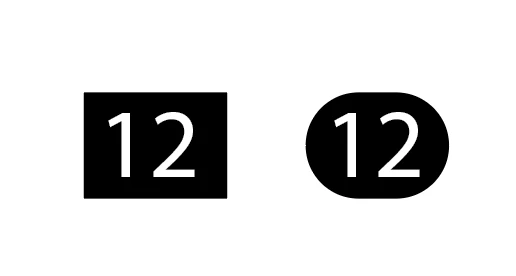

I'm not sure if there's a term for them, but haven't found any in Adobe Fonts.

Thanks!

Correct answer Tarun Saini

Hi @turner111,


Thanks for reaching out! You can try using Wingdings or Wingdings 2, as both include encircled digits.

Here’s how to get started:

  1. Check the character map on the linked page to view and copy the encircled digits — this will help you understand how they are mapped within the font.
  2. In Adobe Fonts, search for “encircled digits” to find other fonts with similar features.
  3. In some fonts, these digits may be accessible through a Stylistic Set in the OpenType settings, so be sure to check there as well.

This should help you locate and use encircled numbers for your design.


Regards,

Tarun

1 reply

Community Expert
September 7, 2025

Some fonts may list the glyphs as dingbats or circled digits. I can't think of any specific fonts carried by Adobe Fonts that have those kinds of number glyphs, but there is bound to be at least some fonts in Adobe Fonts' catalog that have them.


This comes back to a couple of features I wish the Adobe Fonts site had. I'd like each font to have a glyphs table showing all the available characters. It would also be nice if each font had a list of character features. This would include things like native small capitals, different number sets (tabular lining and proportional lining figures), ligatures, alternate characters, etc. Circle and squared number sets would be another to add to that list.


One typeface I know has those kinds of circular and squared number sets: Helvetica Now. But the static and variable versions of Helvetica Now are not available thru Adobe Fonts.

turner111Author
Inspiring
September 8, 2025

Thanks Bobby - Agreed about possible improvements here.

Helvetica Now looks like an interesting project, too.

I just ended up making my own.

Tarun Saini
Community Manager
Tarun SainiCommunity ManagerCorrect answer
Community Manager
September 8, 2025

Hi @turner111,


Thanks for reaching out! You can try using Wingdings or Wingdings 2, as both include encircled digits.

Here’s how to get started:

  1. Check the character map on the linked page to view and copy the encircled digits — this will help you understand how they are mapped within the font.
  2. In Adobe Fonts, search for “encircled digits” to find other fonts with similar features.
  3. In some fonts, these digits may be accessible through a Stylistic Set in the OpenType settings, so be sure to check there as well.

This should help you locate and use encircled numbers for your design.


Regards,

Tarun