
Museo Sans Rounded doesn't work on Illustrator
Hello,
Does anyone know how to solve the issue I'm having?
Here are the details:
I've been having a problem for the last couple of months with Museo Sans Rounded on Illustrator.
I've been using the font normally previously as I have created artwork using it but it doesn't work anymore.
I've checked and the font is synced fine on the Adobe fonts website and my list on the adobe CC app, I don't have any duplicates in my font book. It works on all other applications, inDesign, Photoshop, After Effects, Acrobat etc.
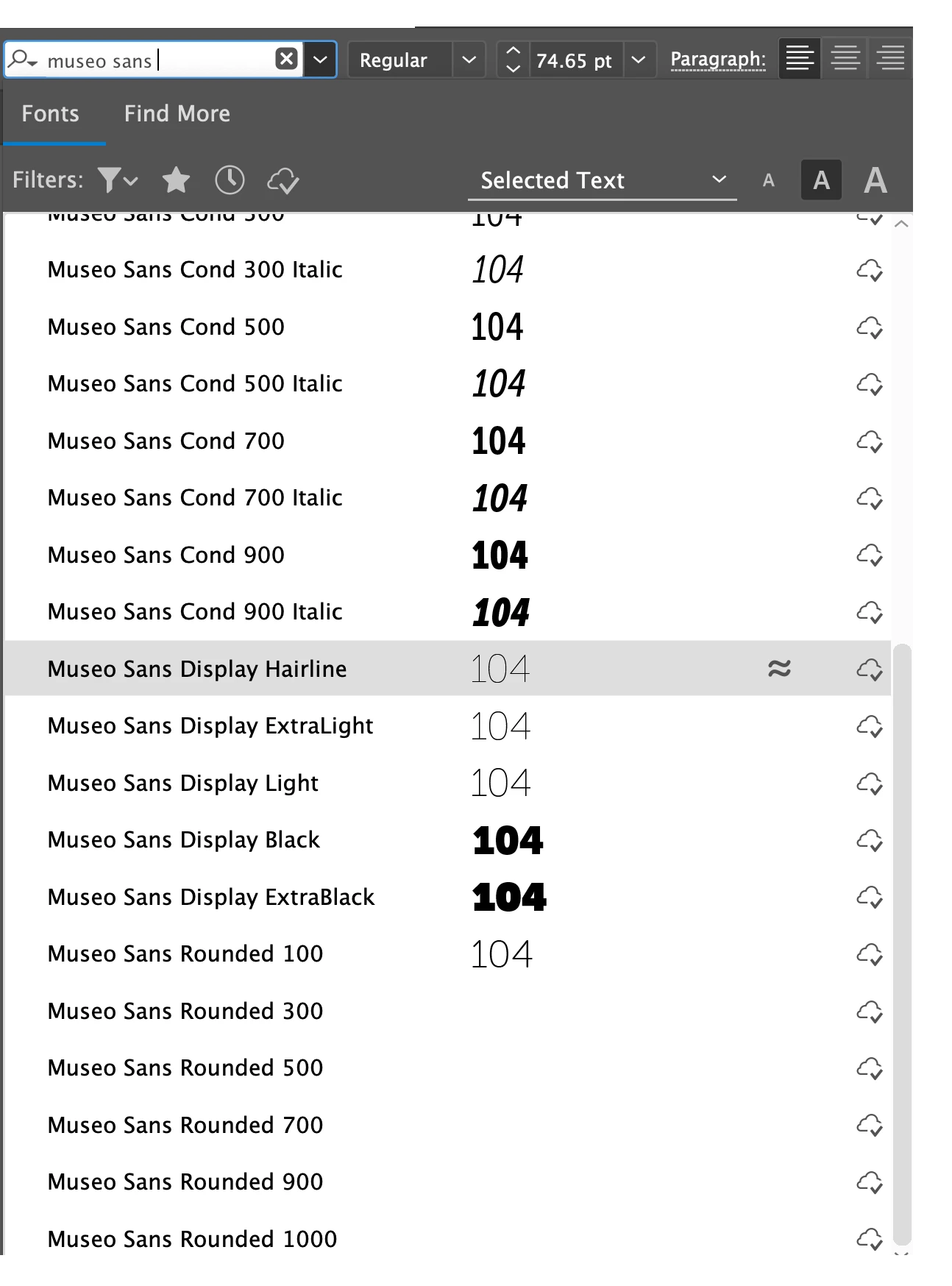
When I look through my font list on Illustrator, even though the name appears there's no preview for any of the weights besides the 100. If I try to select one of these on my text, it doesn't work. the text remains on the font that it was before.
If I open a file that has been using Museo Sans Rounded, all the text disappears. It doesn't say there's a font missing or anything. The text is just not there.
If I preview the file, the text it there and showing fine.
open file on illustrator viewing illustrator file with preview
I'm using Illustrator version 23.0.3 on MacOs Mojave 10.14.3
Memory 24GB
Processor 4 GHz Intel Core i7
Any help is very much appreciated.
Thank you.
Sofia.



 AdChoices