
musilm
Participant
January 2, 2023
Question

Non-breaking space width - font Serenity

  • January 2, 2023
  • 2 replies
  • 714 views

Hello,

I use font Serenity (https://fonts.adobe.com/fonts/serenity) in one of my web project. When I use non-breaking space ( ) in text, the space between words is wider than regular space. It seem that only this font causes problem. Other web projects and fonts render space with normal width. There is nothing special in my CSS or HTML. Changing word spacing or other spacing didn't help.
This topic has been closed for replies.

2 replies

Participant
April 6, 2024

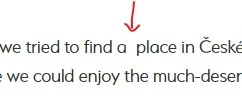
Hello, I am having a similar problem using Minion Pro and Times New Roman. I downloaded a journal article from 1985. The PDF was a scanned image and as such, poor quality for reading. I used the Text Edit tool and Acrobat automatically scanned and made each page editable and converted the scanned text into editable text. However, the editable text was converted to various fonts and font sizes. So I then edited each page to have the same fonts and font characteristics (including making everything left aligned, size 10 pt., Line spacing 1.20, Paragraph spacing after 5, Horizontal scaling 94, and Character spacing -0.17). However... there are multiple times where the width of a single space is very different. If I retype the paragraph, the spacing width is consistent and appropriate. In some places the spaces are a few characters wider (here   is   an   example). In other places, it is REALLY WIDE (here       is       an       example).  I thought it might be because the original text was Justified (all text is spaced out so the last character of every line ends on the right margin) but I changed the alignment to be left aligned and yet the spacing remains even after I delete it and retype the space. I have to retype the entire sentence starting from a point earlier in the paragraph where the spacing is more appropriate. Here is a paste from the document - The authors are Deci and Ryan (1985, p.111, https://doi.org/10.1016/0092-6566(85)90023-6) and I make no claim to their work. The only editing I have done has been to the format of the PDF, not their words or ideas (that was Academic Butt-Covering).


I retyped the first sentence of the text in the examples below and achieved appropriate widths of the spaces. The paragraph that follows has the irregular-sized width of the spaces. The screenshot demonstrates that I have already edited the text as I described above. 


Minion Pro Font screenshot


This remains an issue for the Times New Roman font as well. 


I also tried it in an Adobe font - Adobe Clean and you can see the same issues. 


Is there a way to change the width of the spaces between words? I experimented using various Horizontal Spacing and  Character Spacing values with no change in the width of the spaces. 

I would appreciate any guidance or thoughts that you at Adobe have or from anyone in the Adobe community. 

Thank you!

VJ


Participant
September 4, 2024

Really helpful. Thanks for sharing detailed answer, I am searching this for last 3 days. 

Tarun Saini
Community Manager
Community Manager
January 3, 2023

Hi there,


We're sorry to hear about your difficulties. Would you mind sharing the live URL of the website via private message in order for us to observe the issue?


Regards,

Tarun

musilm
musilmAuthor
Participant
January 4, 2023

Hello,

I've sent you private message. Thank you.

Tarun Saini
Community Manager
Community Manager
January 4, 2023

Thanks for sharing the link. I have shared it with our engineering team. I will let you know if there is anything required.