


Participant
November 15, 2022
Answered

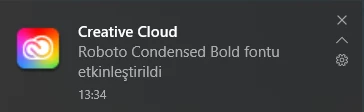
Roboto Condensed Bold activated issue

  • November 15, 2022
  • 1 reply
  • 996 views

Since the last time i Photoshopped some banners every time i restart or open my PC, Creative Cloud do some downloading then "Roboto Condensed Bold activated" notification pops up. I think it also eats up a tiny bit of my space. What should i do to prevent this?

 

This topic has been closed for replies.
Correct answer Neelamk

Hi There,


Thank you for reaching out to us. "Roboto Condensed Bold activated" means this font gets activated when you launch. If you do not want this font to be activated. please go to fonts.adobe.com>> search for the Font " Roboto" then just deactivate the font and its families available. Then sign out of the Creative Cloud Application and sign in back, it should resolve the issue.


Please let me know how it goes.


Regards,

Neelam

1 reply

Neelamk
NeelamkCorrect answer
Legend
November 21, 2022

Hi There,


Thank you for reaching out to us. "Roboto Condensed Bold activated" means this font gets activated when you launch. If you do not want this font to be activated. please go to fonts.adobe.com>> search for the Font " Roboto" then just deactivate the font and its families available. Then sign out of the Creative Cloud Application and sign in back, it should resolve the issue.


Please let me know how it goes.


Regards,

Neelam

FurcayneAuthor
Participant
November 23, 2022

I solved the issue by saving fonts. Thank you.