
Participant
June 26, 2025
Question

Search function in Adobe Font Manager

  • June 26, 2025
  • 1 reply
  • 179 views

Hi! I'm posting this here in the hopes that someone in the Adobe Product team will see it:
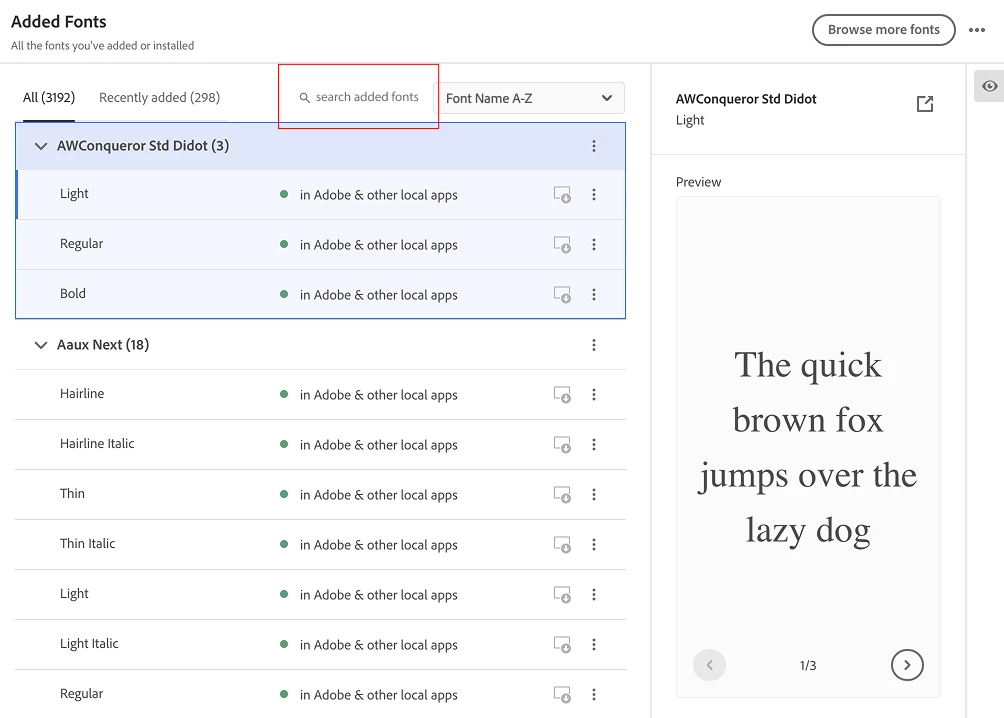
There needs to be a search function here so we can find fonts that have uninstalled themselves. I'm begging for this - it's insane to make us scroll through the list, it's massive and takes forever to load. Look! I've solved the UI - please add it!

    1 reply

    Tarun Saini
    Community Manager
    Community Manager
    June 27, 2025

    Hi @JessFlo,


    Welcome to the community! Please click on the Installed fonts from the left pane in the Creative Cloud Desktop app. You will see the Recently expired tab, where you can see fonts that are no longer in use.  You can see the screenshot below for more information- 


    For more information, please check this article and let us know if that helps- https://helpx.adobe.com/fonts/using/managing-fonts.html 


    Regards,

    Tarun

    JessFloAuthor
    Participant
    July 15, 2025

    Hi Tarun!


    Thanks. When I click that tab it says "no recently expired fonts" unless I go back 30 days, in which case there are 76. Also, they are always displayed open so you can only see one font at a time (see screenshot).
    Regardless, I work with a large team of designers working on many projects concurrently. I need to manage a large number of fonts at any time and the fact that there is no way to search them is a huge oversite of the desktop app design.

    Best wishes, Jessie

    Tarun Saini
    Community Manager
    Community Manager
    July 15, 2025

    Thanks for your response @JessFlo,


    I've asked our product team to look into this. Once I get any response from them, I'll get back to you.


    Regards,

    Tarun