

andrzejc47588607
Inspiring
December 9, 2022
Answered

Sofia Pro

  • December 9, 2022
  • 1 reply
  • 1956 views

Hello,

I have a problem with Sofia Pro font.


Sofia Pro Black 115pkt.


In wordpress "Q" look like a picture below.
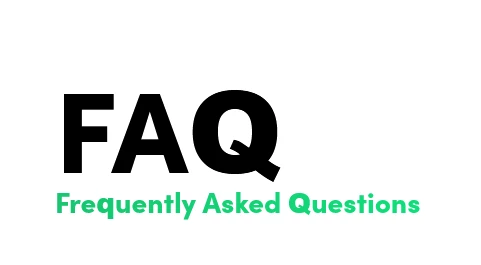
 

    This topic has been closed for replies.
    Correct answer Tarun Saini

    Thanks for your response. It seems like you have selected the Polish language subset in the web font editor. This subset doesn't include Q & X, and this is the reason you're getting the fallback font for those characters on the page. The fix is to edit the web font project to include “English” language subset, which will cover the Q & X.


    Please check this article and see if that helps: https://helpx.adobe.com/fonts/using/language-support-subsetting.html

    Once you save the changes, then the letters will be displayed in Sofia Pro Black. If this doesn’t fix the problem, please share the URL and your Adobe ID via private message so that we will look into it further.

    1 reply

    Tarun Saini
    Community Manager
    Community Manager
    December 9, 2022

    Hi @andrzejc47588607,


    Thanks for writing to us. Could you please share the URL of the issue where you see this? Which browser are you using? Have you tried using another browser to check if its happening on all the browsers? We;re here to helps, just need some info.


    Regards,

    Tarun

    andrzejc47588607
    Inspiring
    December 12, 2022

    Hey, the problem with this font is that while in photoshop itself - and in Apple (Safari) - the font renders well, on Windows and in Chrome/Firefox/Opera/Edge browsers some letters are displayed differently than they should be - and it's not about special characters or e.g. Polish letters - but about letters such as Q or x

    Tarun Saini
    Community Manager
    Tarun SainiCommunity ManagerCorrect answer
    Community Manager
    December 12, 2022

    Thanks for your response. It seems like you have selected the Polish language subset in the web font editor. This subset doesn't include Q & X, and this is the reason you're getting the fallback font for those characters on the page. The fix is to edit the web font project to include “English” language subset, which will cover the Q & X.


    Please check this article and see if that helps: https://helpx.adobe.com/fonts/using/language-support-subsetting.html

    Once you save the changes, then the letters will be displayed in Sofia Pro Black. If this doesn’t fix the problem, please share the URL and your Adobe ID via private message so that we will look into it further.

