


December 23, 2025
Answered

All videos distorted when viewed in premiere

  • December 23, 2025
  • 6 replies
  • 386 views

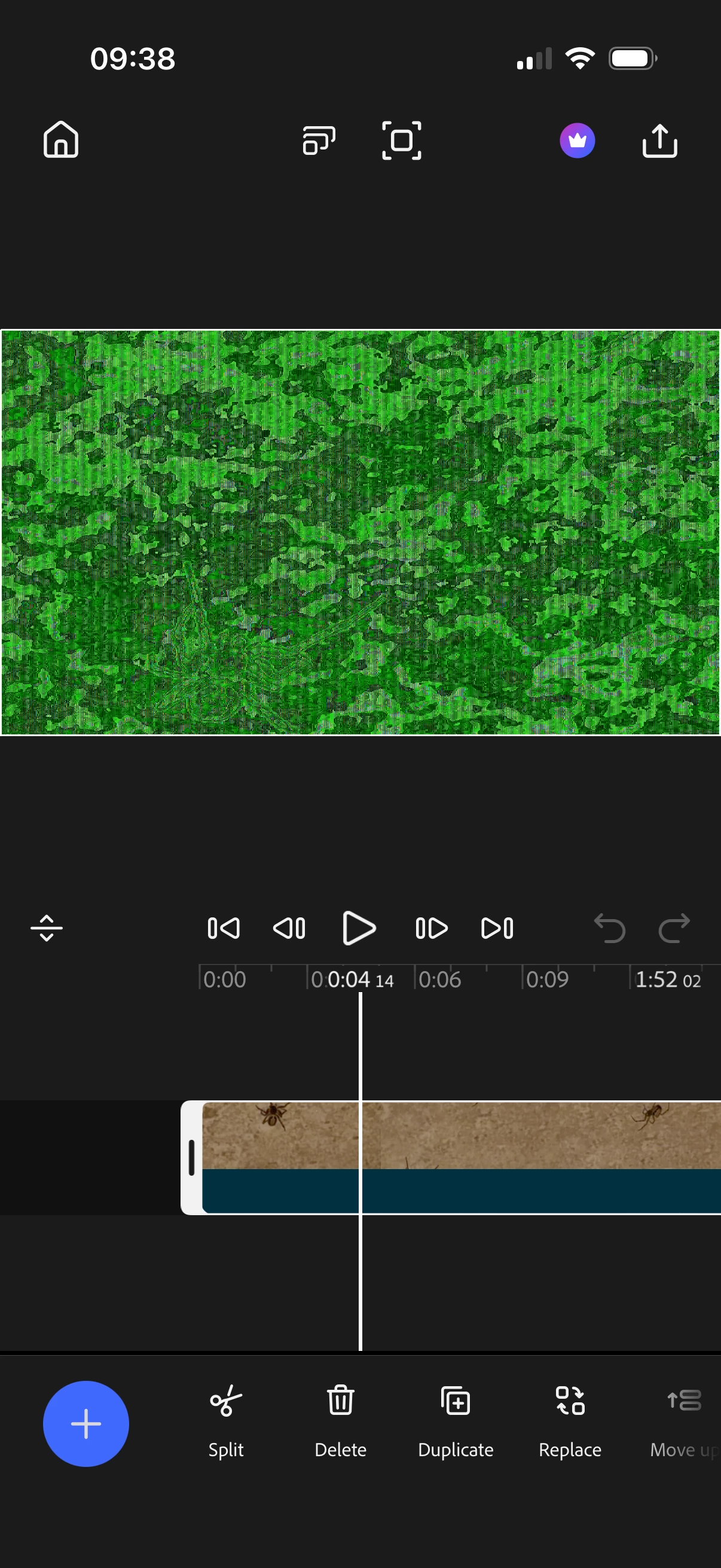
when I try to view or edit videos in Premiere the videos are distorted as shown below. The app is up to date (have tried deleting and reinstalling) and my phone is an iPhone 17pro with up to date iOS.

anyone else having this issue or know how to fix it please?

Correct answer Peter Garaway

Hi everyone — thanks so much for hanging in there. We’ve just pushed a new update to the App Store, version 26.2.1, which includes a fix for this issue.

We really appreciate your patience and support, and as always, thank you for using Premiere. If you run into anything else, please let us know . 

Happy Editing!  

6 replies

Peter Garaway
Adobe Employee
Peter GarawayCorrect answer
Adobe Employee
January 20, 2026

Hi everyone — thanks so much for hanging in there. We’ve just pushed a new update to the App Store, version 26.2.1, which includes a fix for this issue.

We really appreciate your patience and support, and as always, thank you for using Premiere. If you run into anything else, please let us know . 

Happy Editing!  

Peter Premiere engineering team
January 21, 2026

This is great news, thank you for working hard to continually improve the app. I have sent you an email regarding a little tweak required on something else. But I am confident that this artefact issue has been sorted. Much appreciated, and unexpected.  

January 20, 2026

Just to add my voice to this. Im on the current latest version 26.1.0 but still facing this issue. I've never been able to use Premier because of this. 

IMG_2948.png

IMG_2954.png


January 20, 2026

Hang on in there, there is a fix coming for sure.
I've been lucky enough to test a beta, and it's been no issue with any format I've thrown at it so far. It was a very challenging bug to solve from their end. 


My guess is that they are just double and triple checking things their end, before an imminent public release which should finally put an end to all our woes. 

Peter Garaway
Adobe Employee
Adobe Employee
January 13, 2026

Update on green/glitchy frames in the monitor


Thanks to everyone who reported seeing green or glitchy frames in the monitor. We’ve just released a new update to the App Store (build 26.1.0) that we hope addresses this issue.


Please update to the latest version and let us know if you’re still experiencing any problems. This was a tricky issue to track down on our end, so your feedback is really helpful.


Thanks for your patience, and sorry for the inconvenience.


Happy Editing! 

Peter Premiere engineering team
January 13, 2026

I'm really sorry to be the bearer of bad news, but I saw the update and got hyped.... but the issue remains. 
If you need me to make a new project and export it out again for you in the morning via email, do let me know. 

It shouldn't theoretically matter updating vs deleting and reinstalling the app, should it? 

Thanks for not giving up on us!

Warren Heaton
Community Expert
Community Expert
January 3, 2026

Is this happening with footage that was recorded on the iPhone?

If not, where did the source footage originate from?

More information about the footage will be helpful in figuring out why it isn't playing as expected.

Download MediaInfo for iPhone/iPad, open the problem clip, take a screenshot of the file's info, and then post that here.


January 3, 2026

It's happening to dlog footage shot on a DJI mini 4 pro and to ProRes log, not HDR, on iPhone.


All other formats work correctly. I would say it wasn't supported, but it exports just fine, it's just the video preview which is covered in lines as shown above. 

ODDLY....just as I was playing around - if I insert a format that doesn't have an issue into the timeline, alongside the DLOG or  ProRes that didn't seem supported, it suddenly works just fine. 

So now, the issue is only when there is either JUST problem files in the timeline. Such as Dlog M, or ProRes log shot on iPhone. If format such as ProRes HDR is added, or standard iPhone video formats, it will playback without issue. 

Peter Garaway
Adobe Employee
Adobe Employee
January 5, 2026

@alex_3217  thanks so much for the details you've already provided. I'm sorry for the delay. In response. Many of the engineering team were off for the holiday season.

I've tried to reproduce this issue, but haven't been able to make it happen yet. To help diagnose this properly, could you share your project file with us? This will allow us to investigate exactly what's causing the failure:


Step 1: Enable Project Sharing
1. Copy this link and paste it into Safari:
2. When you open that link, it should prompt you to launch Premiere.

Step 2: Share the Project
  1. Go to your Projects screen
  1. Find the problematic project thumbnail
  1. Tap the "⋯" (three dots) menu below your project
  1. You should now see "Share Project" as an option
  1. Share it via email (pgaraway@adobe.com) or file sharing link

Once you send it, we can analyze what's causing the failure and provide a specific fix. Thank you!
Peter Premiere engineering team
January 2, 2026

I have same thing and have no idea how to fix. Please help me if you find how to fix it.

December 23, 2025

I've got the exact same issue, the video exports just fine, without all that glitching- but obviously it's no good to edit with. Also the video thumbnail in the timeline usually shows an accurate preview of the edits I've made. 

Do let me know if you find a solution. I was really hyped to finally be able to apply LUTs on the go with minimal fuss or expensive apps. Really hope it gets sorted.