


Participant
Oct 1, 2025 8:07 PM UTC
Answered

Premiere Mobile App Export to Desktop App - Broken

I am thrilled to start playing with the Premiere mobile app, but can find ZERO support on how to open an exported project from the mobile app on the desktop app.

1. In the mobile app, I have a project with 5 clips. I've done some basic trimming to the clips, that is all. I hit Export to "Premiere desktop (beta)" and get a success.
2. I go to my Creative Cloud app, files tab > projects, and sure enough I see the project! 5 clips and a project file. Mission success.
3. When I open Premiere Pro (beta) and select "open project" and navigate to the "cloud media" folder (Adobe > Premiere Pro (beta) > 25.5 > Cloud Media) no files show up whatsoever.
4. Back in Creative Cloud app, files tab > projects I download all the clips and project files (a painstaking process in itself — first have to "move" all of the files from the "projects" folder into the "files" folder because no download options exist in "projects").
5. Premiere Pro (beta) nor any other version of premiere is able to open the .otio files

All the videos I see simply showcase the mobile app side of things, and call it successful after the export. I can find no documentation for how to get the project open on the desktop app, and have spent several hours today trying to figure it out to no avail.

Is anyone experiencing the same issue? Without the ability to send a mobile project to desktop for finishing, I see no way Premiere (mobile) has any differentiation whatsoever from any other mobile editing solution.

bbb_999
bbb_999Correct answer
Community Manager
Oct 1, 2025 8:17 PM UTC

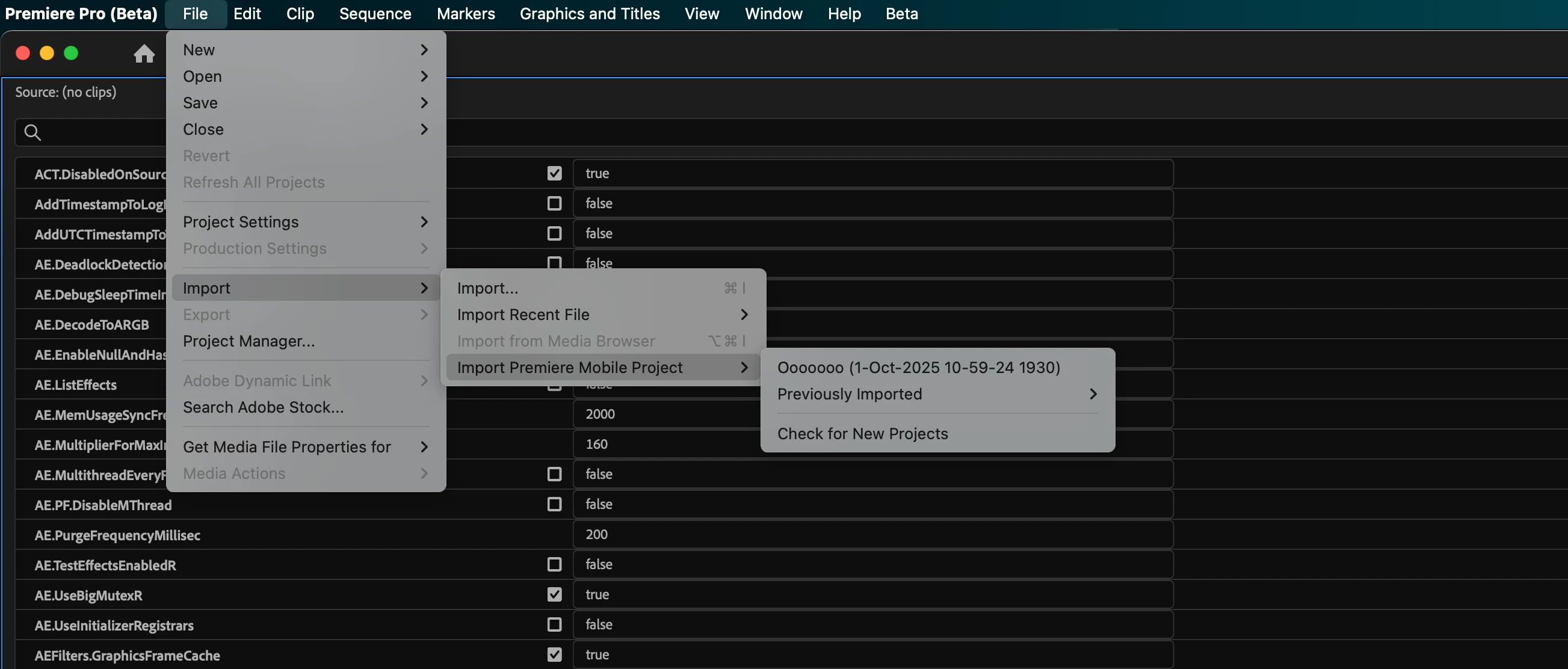
In the current PPro beta, you can get to your shared mobile projects from File --> Import --> Import Premiere Mobile Project.

From there, you can also check for newly shared projects, and re-import previously imported projects. 

21 replies

Participant
Sep 26, 2026 8:42 AM UTC

i have the same problem. It’s not working. I have the newest beta version.


Translate
Participant
Oct 12, 2026 4:03 PM UTC

Same problem here, did you find any solution? Thanks

Translate
John T Smith
Community Expert
Community Expert
Oct 27, 2025 4:24 PM UTC

This discussion needs to be moved to the correct forum


Premiere on iPhone - Adobe Product Community

Translate
Participant
Oct 6, 2025 9:29 PM UTC

For some reason the File -> Import ->Import Premier Mobile project item is not active for me. Anyone had the same? How to resolve?

Translate
Adobe Employee
Oct 7, 2025 3:16 AM UTC

Something broke in a recent beta build of Premiere Pro, sorry! The team is on it already.

Translate
Adobe Employee
Oct 10, 2025 12:27 AM UTC

This is now fixed as of Premiere Pro desktop version 25.6.0x96, which was released yesterday, or maybe this morning.

Translate
bbb_999
Community Manager
bbb_999Community ManagerCorrect answer
Community Manager
Oct 1, 2025 8:17 PM UTC

In the current PPro beta, you can get to your shared mobile projects from File --> Import --> Import Premiere Mobile Project.

From there, you can also check for newly shared projects, and re-import previously imported projects. 

Translate
Participant
Oct 1, 2025 8:30 PM UTC

Yes!! Fantastic, thank you so much 👍

Translate