

2-pop slightly out of sync when converting to H264 in Media Encoder
When I export an H264 out of Premiere, or convert a file to H264 using Media Encoder, I see that the audio ends up about 1/3 frame out of sync. It's a bit troubling because we use Media Encoder and Premiere for professional work.
I ran into this when I sent a Sound Editor an H264 picture reference from Premiere. He complained that the 2-pop was slightly out of sync – making it an inaccurate reference.
Maybe it has to do with the fact that H264 in Premiere and Media Encoder only offers AAC audio, not Linear PCM?
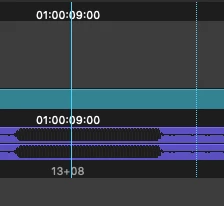
Here's the 2-pop for the Leader built into Premiere. It's a bit odd that it's a pyramid shape instead of a rectangle. When it's brought into another software that shows waveforms differently (ex. Avid, below), it's a bit unclear exactly where the 2-pop is supposed to start.
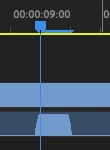
When I bring a Premiere exported or Media Encoder converted H264 into Avid, the 2-pop is about 1/3 frame off.
Can Adobe add Linear PCM audio as an option for H264? Maybe that will fix this? It'd also be nice if the 2-pop built into Premiere was a true rectangle instead of this weird pyramid shape.


 AdChoices