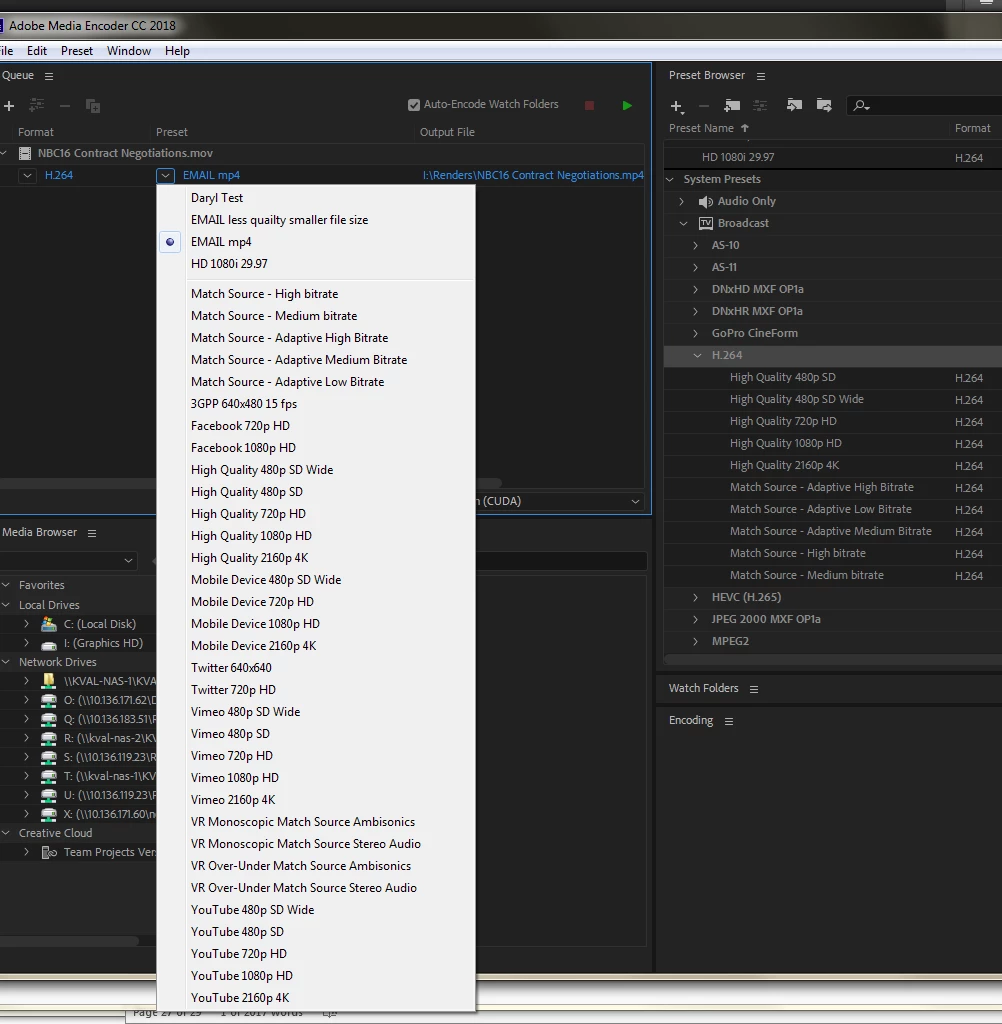
We just updated to 2018, and I don't see the same pulldown presets as we had before. First question - what is the different between the System presets (right), and the presets you can get in the pulldown menu in the queue (left)? Second question is how do I recover the longer list of options that we had in 2017?
This topic is closed to new replies. Start a new post to keep the conversation going.
Correct answer thnord
First question: The presets you see on the left are all of the available presets for h.264. On the right you see a reduced set of presets based on whatever category you have exposed. In your example you are showing all of the h.264 presets under the "Broadcast" category.
Second question: We are working on adding the legacy presets to the Adobe website as a separate download. In the meantime if you still have a previous version installed you can export the presets you use and then import them in to the latest version.
What I'm curious about is what presets you are missing that you'd like to have. Our goal with reducing the list was to give users a more up-to-date list of presets that, as much as possible, gave you similar output to the old presets. If you feel there is something we missed I'd love to know more about your requirements so we can consider such a preset for a future release.
AND why do I have to open Media Encoder for the presets to load???? After searching on the web I uncovered this solution...but I use the Presets in Premiere first, not Media Encoder. Another 30 minutes of my time I'll never get back.
Why the heck doesn't Premiere CC18 (V12) or whatever you call it, have the presets I have made and saved already imported into the program. You have decided to redo Premiere presets - fine, but how about thinking about the end user. I have 40 presets I need for specific TV stations I send to , and now I have to fish around and find all of my presets and re-import them.
First question: The presets you see on the left are all of the available presets for h.264. On the right you see a reduced set of presets based on whatever category you have exposed. In your example you are showing all of the h.264 presets under the "Broadcast" category.
Second question: We are working on adding the legacy presets to the Adobe website as a separate download. In the meantime if you still have a previous version installed you can export the presets you use and then import them in to the latest version.
What I'm curious about is what presets you are missing that you'd like to have. Our goal with reducing the list was to give users a more up-to-date list of presets that, as much as possible, gave you similar output to the old presets. If you feel there is something we missed I'd love to know more about your requirements so we can consider such a preset for a future release.
I'm not happy that Apple TV is missing. Tried using Mobile Devices as a preset thinking it would work and it doesn't play in Itunes/Apple TV
Also find it strange that for h264 Broadcast the bitrate has gone done from 30s to 20 MBPS (I've bumped it back up as a saved preset, but wondering why you lowered it. Seems very low for optimal broadcast rate for h264)




 AdChoices